How Brand Mention Alerts Save You Massive Time Weekly
W hat is a brand mention alert? A brand mention alert is an automated notification that fires the moment your brand, a competitor, a person, or a topic is referenced online, across news, blogs,…


W hat is a brand mention alert? A brand mention alert is an automated notification that fires the moment your brand, a competitor, a person, or a topic is referenced online, across news, blogs, forums, social platforms, reviews, and now AI answers, without you searching for it. A useful alert carries enough context to decide whether to ignore, reply, escalate, save, or turn the mention into an asset.
Summary
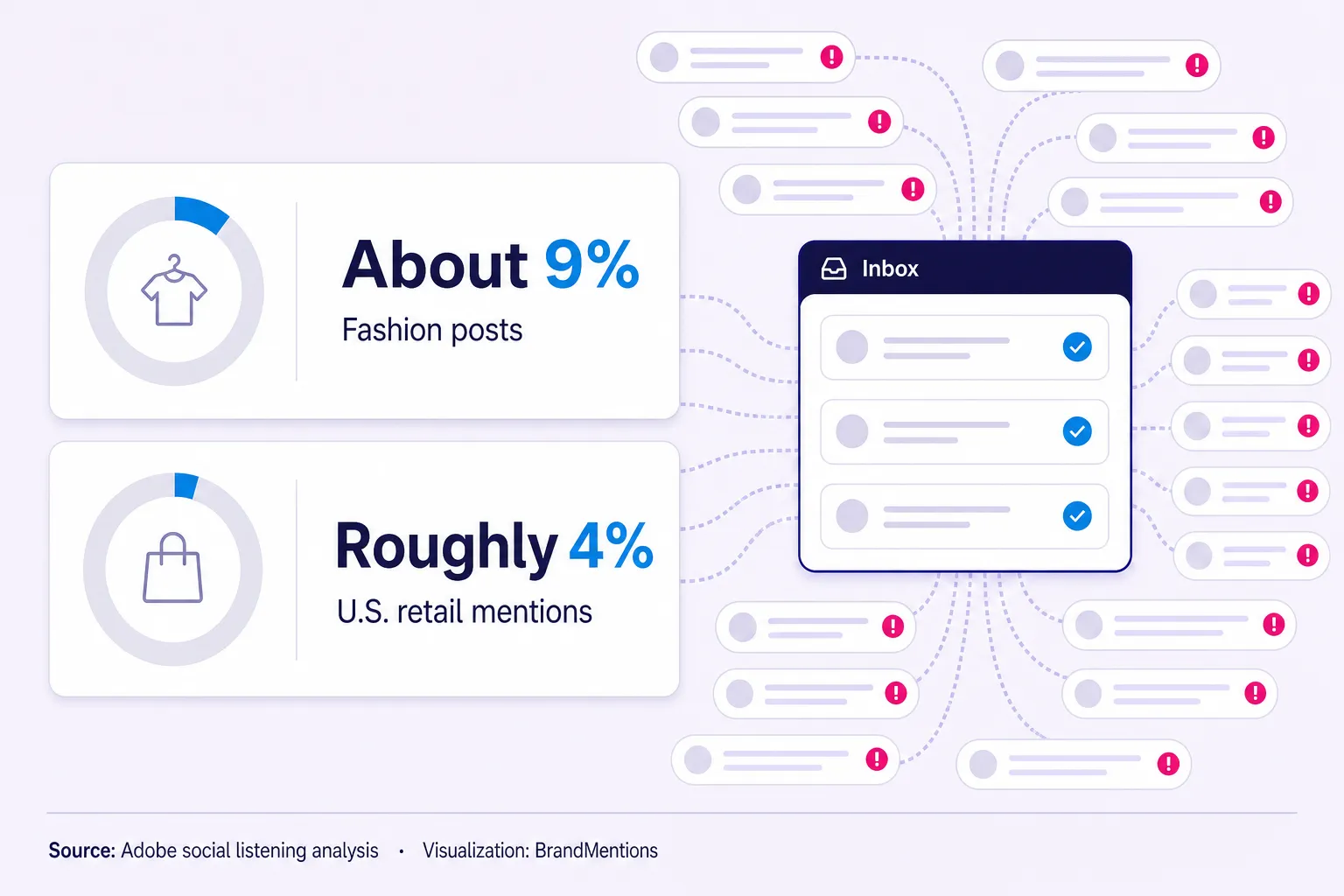
- Brand mention alerts catch what native notifications miss. Native platform notifications only fire when someone talks to you. They miss the larger share of public conversation, where people reference a brand without tagging it. Adobe's analysis of retail social data found brand handles appeared in only about 9% of fashion posts and about 4% of U.S. retail brand mentions.
- Response speed now shapes reputation directly. Sprout Social's Q2 2026 research found 64% of consumers expect brands to respond publicly on social during a crisis, and 84% say response speed affects how they perceive it.
- Reviews belong in the same alert workflow as social. BrightLocal's 2026 survey found 97% of consumers read local business reviews, 81% expect a response within a week, and 50% are put off by generic, templated replies.
- AI answers are a new monitoring surface. Google reported in June 2026 that AI Overviews passed 2.5 billion monthly users and AI Mode passed 1 billion, so how answer engines describe your brand now matters as much as where your pages rank.
- Alerts save time only when they route the right signal to the right owner. A raw stream of everything is still manual monitoring, just with a bigger inbox.
Before you add another tool to the stack, answer one question: what decision will its data change? If you cannot name the decision, you are buying a dashboard, not an insight.
That is where most alert systems break. They collect everything, then somebody skims a feed on Friday, reads ten irrelevant posts, misses the one customer thread that mattered, and calls it monitoring.
Most people do not have a monitoring problem. They have an attention problem. The mentions that actually change a decision are buried inside thousands that do not. The whole job is closing the distance between a public signal and a business action.
At a Glance: Which Brand Mention Alert Fits Your Goal
- Best for Zero Budget: Topical and brand alerts on Google Alerts. Free, fine for indexed web and news, useless for social, reviews, and anything time sensitive.
- Best for Fast ROI and Crisis Control: Social media alerts. Catch untagged complaints and viral moments in minutes, before silence becomes the story.
- Best for Reputation Risk: Brand and review alerts. Reviews and third-party trust signals shape buyer decisions before a prospect ever reaches your site.
- Best for Competitive Intelligence: Competitor and anomaly alerts. Watch rivals' launches and audience reactions, and fire only when their mention volume breaks its normal baseline.
- Best for Content and Campaign Research: Topical and question-format alerts. Capture the exact language buyers use before it shows up in keyword tools.
- Best for Creator Programs: Influencer and expert alerts. The real signal is not what the creator posts. It is how their audience reacts.
- Best for AI-Era Visibility: AI answer visibility alerts. Track how ChatGPT, Perplexity, and Google AI Overviews describe your category, a surface your search rankings no longer predict.
The rest of this guide breaks each of these down so you know what to set up on Monday morning, and what to leave off.
How Are Brand Mention Alerts Different From the Notifications You Already Get?
Native notifications only fire when someone talks to you. Brand mention alerts fire when someone talks about you. That distinction is the entire game.
Think about how people actually reference brands. They complain in a Reddit thread, drop your name in a YouTube comment, ask "is this reliable?" in a review section, or post a product photo with no caption at all. None of that triggers a platform notification, because none of it tags your account. Adobe's social listening analysis of retail data found that brand handles appeared in only about 9% of relevant fashion posts, and in U.S. retail mentions the handle rate dropped to roughly 4%.
Those figures are retail specific, not a universal law. But the pattern holds across industries: if you read only your @mentions, you are reading a curated fraction of the truth, mostly from people who wanted your attention. The people forming opinions rarely raise their hand.
The Blind Mention Rule: If your workflow tracks only tags and handles, you are measuring inbox activity, not market perception.
A brand mention alert closes the gap by matching your brand name, product names, common misspellings, and nicknames wherever they appear, tagged or not. It also matters how fast the alert reaches you. A complaint you see in ten minutes is a conversation. The same complaint seen the next morning is a screenshot with three hundred replies, which is why real-time notifications beat a daily digest for anything reputational.
If you only watch the mentions that tag you, you are reading fan mail while the real conversation happens in the next room.
Do Brand Mention Alerts Still Matter When AI Answers Are Replacing Search?
They matter more, not less, because a new surface just opened and almost nobody is watching it. When a buyer asks an assistant for "the best tool for X," the engine describes you in a sentence you did not write, using sources you may not know about.
The scale is real. Google reported in its June 2026 investor presentation that AI Overviews passed 2.5 billion monthly users and AI Mode passed 1 billion. That is a lot of buyers reading a summarized version of your brand instead of clicking to your page.
Your search ranking no longer tells you how you look inside those answers. Google's Search Central generative AI guidance states that pages must meet technical requirements, be indexed, and be eligible to show a snippet to appear in generative features. Then, on June 3, 2026, Google announced generative AI performance reports in Search Console, showing impressions for URLs appearing in AI Overviews, AI Mode, and generative features in Discover. That gives you a measurement layer, but not the whole answer. It tells you whether your URLs appeared. It does not tell you whether the summary framed your brand correctly.
Your search ranking and your AI reputation are now two separate scoreboards. Watching only the first leaves you blind to the version of your brand buyers actually trust.
So the alert job expands. You track web, social, and reviews, and you add periodic checks of how the major answer engines describe your brand and your category. One honest caveat: standard alerts cannot see inside a private one-on-one chatbot session. What you can watch is the public source material those models read, the reviews, forum threads, and articles that feed the summaries. This is the reputation-evidence layer, and it is where a cross-channel monitor like BrandMentions earns its place, pairing real-time alerts with deep historical mention data so you can see both what is being said right now and how the narrative feeding AI models has shifted over months.
How Fast Do You Actually Need to Respond?
Response times should range from a few hours for social crises to a few days for customer reviews, while legal and influencer mentions should prioritize accuracy over raw speed.
The answer depends on the mention type, and treating them all the same is how teams burn out.
A crisis thread needs faster handling than a neutral blog mention. A review needs a more careful response than a casual comment. A creator claim needs a compliance check before amplification. Sprout Social's Q2 2026 crisis research found that half of consumers hear about a brand crisis first on social media, 64% expect a public social response rather than only a press statement, and 84% say response speed shapes their perception of the crisis.
Reviews run on a slower but still visible clock. BrightLocal's 2026 Local Consumer Review Survey found 89% of consumers expect owners to respond to reviews, 19% expect a same-day response, 32% want one by the following day, and 81% expect a response within a week. Google itself notes that Business Profile review replies are usually posted within about 10 minutes of submission but can take up to 30 days, per Google Business Profile Help, so build a buffer into your process.
The Reply Window Rule: Social crisis mentions need triage within hours, customer reviews need response ownership within days, and legal or influencer mentions need accuracy before speed.
Fast does not mean careless. It means the right person sees the mention before the window closes.
How Many Brand Mention Alerts Should You Run Before They Become Noise?
Fewer than you think. The most common failure I see is a team that sets fifteen alerts in an afternoon, gets buried in a week, and mutes all of them by month two. A dead alert is worse than no alert, because it gives you false confidence.
Run every alert through one test before you create it. Name the decision it will change: respond, escalate, pitch, publish, adjust budget, correct a source. If you cannot name one, you are building a dashboard, not a signal.
A practical starting point for most teams is four to six live alerts: your brand plus misspellings, one or two competitors, one high-value topic, one people or influencer alert, and a temporary one for a live campaign that you retire when the campaign ends. That is enough to catch what moves your numbers without training yourself to ignore the inbox.
The Mention-to-Decision Rule: If an alert cannot change a reply, a route, an asset, a campaign, a product note, or a risk decision, it is noise.
The Brand Mention Alert Priority Matrix
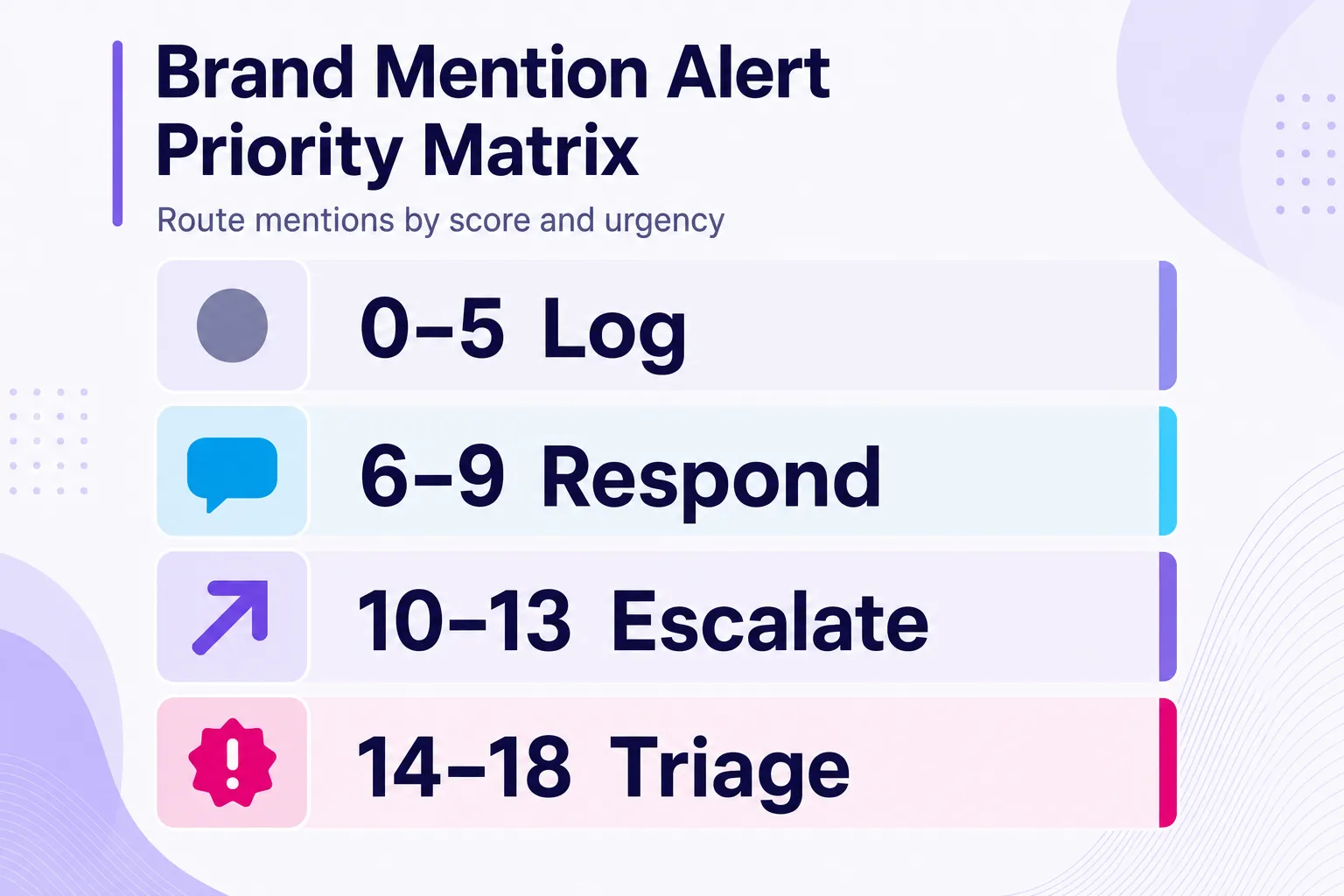
Most teams do not need more alerts. They need a scoring system that decides what deserves attention, who owns it, and how fast it moves. Score each incoming mention across six factors, then route by total. These are practical thresholds, not platform metrics, so adjust them by industry risk.
| Signal | 0 points | 1 point | 2 points | 3 points |
|---|---|---|---|---|
| Sentiment severity | Neutral | Mild complaint or confusion | Clear frustration, accusation, or churn signal | Safety, legal, fraud, discrimination, or public crisis |
| Source visibility | Low-audience account | Niche community or customer thread | Industry publication, creator, or high-engagement thread | National media, regulator, or fast-spreading post |
| Buyer proximity | General commentary | Research question | Comparison, pricing, or alternative query | Purchase-blocking or renewal risk |
| Velocity | No replies or shares | Slow discussion | Active replies within the day | Rapid spread across channels |
| Correctability | No action needed | Simple response | Needs internal input | Needs legal, product, or executive approval |
| AI evidence risk | Unlikely to be indexed | Possible indexed source | Persistent review, forum, or article | Repeated claim across sources AI may synthesize |
Routing thresholds
| Score | Action | Owner | Target timing |
|---|---|---|---|
| 0 to 5 | Log only | Marketing ops | Weekly review |
| 6 to 9 | Respond or save for content insight | Channel owner | Within 24 hours |
| 10 to 13 | Escalate and respond with context | Marketing plus support or product | Same business day |
| 14 to 18 | Crisis or legal triage | PR, legal, executive owner | Immediate review before public response |
The matrix protects you both ways. A sarcastic post from a zero-reach account does not deserve a 40-minute meeting. A quiet Reddit thread comparing you with three rivals might deserve a product-marketing note, because it reveals the buying criteria your website failed to answer.
The Main Types of Brand Mention Alerts and How to Use Them
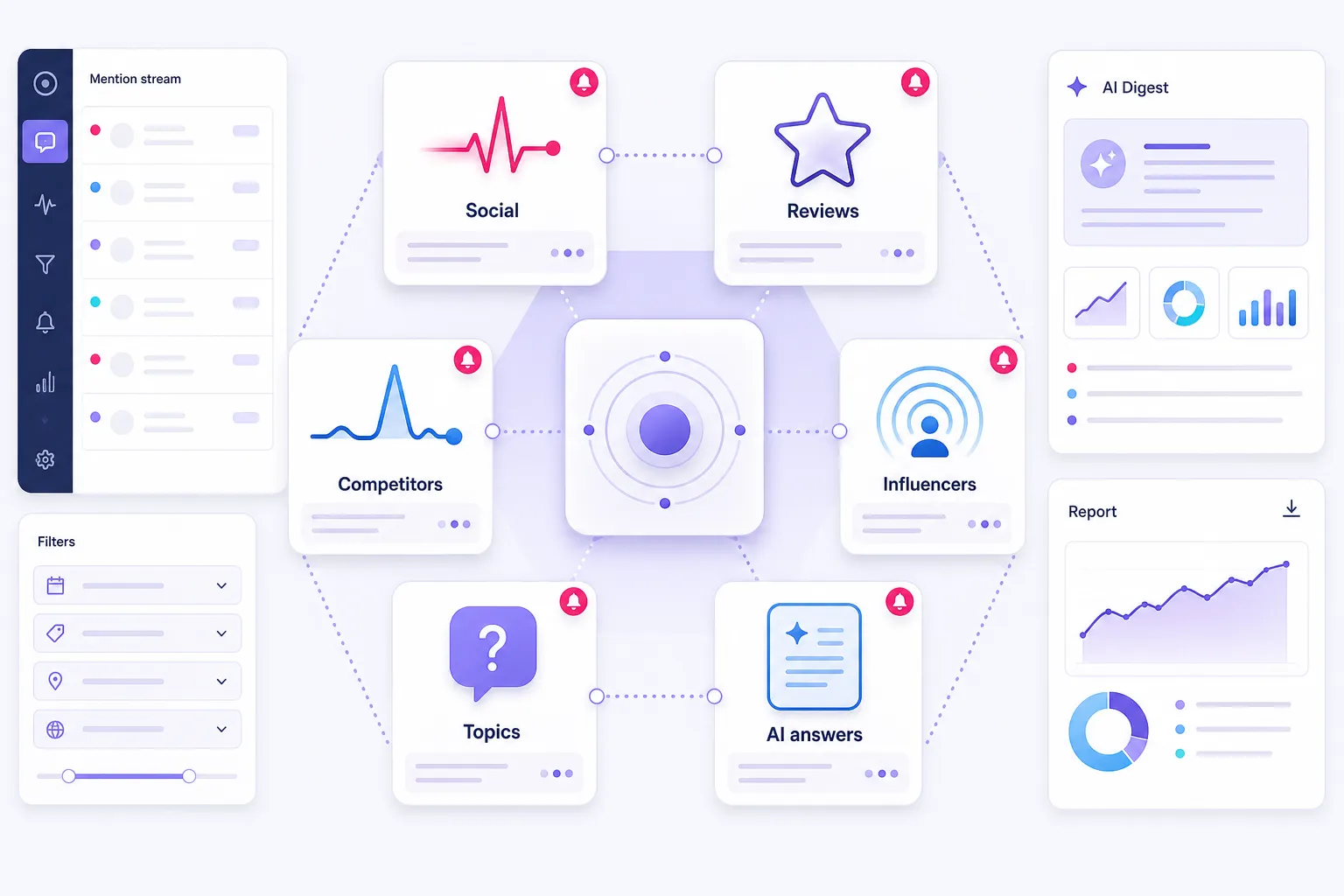
1. Social Media Alerts: Best for Untagged Conversations and Crisis Control
Before you promise "real-time" coverage everywhere, check the actual access constraints. The X API rate limits list the user mentions endpoint at 450 requests per 15 minutes per app and 300 per user, with the filtered stream capped at one connection, 1,000 rules, and 250 posts per second. These limits are not something you manage personally, but they explain why "just check the platform" is not a serious operating model, and why precise Boolean queries beat broad ones.
Social alerts catch conversations where people discuss you, your campaign, or your event without tagging your account. This is where time disappears. A social manager checks notifications, searches the brand name, checks a hashtag, checks comments, checks Reddit, then asks support if anyone already saw the complaint. That is not monitoring. That is scavenging.
Build these around how customers actually speak. Track your brand name without a handle, product names without the brand, campaign phrases, executive names, and your brand paired with complaint verbs like "broken," "refund," "cancel," "down," or "worth it." For anything with negative sentiment or a high-reach account, route it to an instant push. Batch neutral mentions into a twice-daily digest.
Do not build social monitoring around your handle. Build it around how customers speak when they are annoyed, comparing options, or asking strangers for advice.
Non-obvious insight: The mentions worth catching fastest are rarely the angriest ones. They are the calm, specific complaints from credible accounts, the "I switched away because of X" posts that read like a review. Those spread because they are believable, and they are the ones future buyers find later. When one appears, your playbook for handling negative mentions matters more than raw speed.
2. Brand and Review Alerts: Best for Reputation and Trust Signals
Brand alerts cover the public trust layer: reviews, media mentions, directory pages, forums, comparison pages, and complaint sites. The stakes are higher here than in social, because this is what buyers read right before deciding. Ground your workflow in the BrightLocal 2026 review survey, which found consumers consult an average of six review sites, 74% only trust reviews from the last three months, and 50% avoid businesses that reply with generic templates.
Do not just wait for a bad review so you can reply. Watch for recurring themes that quietly kill conversion: "great product, slow support," "easy setup, expensive renewal," "nice team, confusing invoice." Each repeated phrase is positioning research you can feed into product pages, onboarding, and sales enablement.
Review alerts also carry compliance risk that many teams overlook. The FTC Consumer Reviews and Testimonials Rule took effect on October 21, 2024, and it makes agencies, PR firms, and reputation vendors liable for fake reviews, incentives tied to review sentiment, and review suppression. So your workflow should ask more than "should we reply?" It should ask: is this review real, does the claim need correction, is anyone on our side incentivizing reviews the wrong way, and does the response need legal review first?
Non-obvious insight: A review is not only a customer-service item. It is a public training example for future buyers and, increasingly, for AI summaries that condense review themes into one sentence. A cluster of "expensive renewal" reviews does not just cost you one deal. It can become the phrase an answer engine repeats about you.
3. Competitor and Anomaly Alerts: Best for Competitive Intelligence
An alert on a rival's brand name is the cheapest competitive intelligence you can buy, and most teams never set one up. The Reddit Data API Wiki documents a 100-queries-per-minute limit per OAuth client, which is another reason to filter tightly rather than pull everything a competitor's community says.
The better version is an anomaly alert. Ignore normal competitor volume entirely. Fire only when their mentions break the baseline. If a rival usually gets twenty mentions a day and suddenly gets four hundred in two hours, you want to know instantly, because they either launched something that landed or suffered an outage. Either way, it is a same-day decision, not a daily distraction.
Decision threshold: Route competitor alerts to a person, not a digest, only for named events (launch, funding, executive change, viral criticism, or an abnormal volume spike). Everything else belongs in a weekly review.
Non-obvious insight: The richest competitive signal is not what a rival says about themselves. It is the unprompted question their audience keeps asking that they never answer. Each of those is a content brief and often a product gap. Watch the replies to their announcements, not just the announcements. To keep this from becoming a rabbit hole, fold it into a repeatable weekly monitoring plan instead of checking hourly.
4. Influencer and Expert Alerts: Best for Partnership Timing and Audience Fit
Follower count tells you potential reach. Mentions tell you relevance, risk, and timing. Set alerts around three layers: the person (name, handle, newsletter, channel), the topics they own, and the audience reaction to what they publish. That third layer is the one teams miss.
A creator can post a polished piece about your category while their comments show the audience distrusts sponsored picks. A smaller creator may trigger deep, specific buyer questions that are worth more than raw reach. If you run paid programs, keep the FTC Disclosures 101 for influencers guidance close: disclosures must be hard to miss, placed with the endorsement, and not buried behind "more" or at the end of a post. Flag undisclosed partner content involving your brand before you amplify it.
The Audience Reaction Rule: Monitor the replies to the influencer as closely as the influencer. The audience tells you whether the endorsement will travel, stall, or backfire.
Non-obvious insight: The best influencer opportunity is often a creator asking a category question, not one already praising a competitor. A question is an opening to help. A praise post usually means the decision already happened.
5. Topical and Campaign Alerts: Best for Content Ideas and Live Feedback
Topical alerts spot what your market is starting to care about before it reaches your calendar. The free entry point is Google Alerts, which by its own description monitors the web for new indexed content. It is genuinely fine for slow-moving research topics. Its limits are real too: it does not index social platforms, so it misses most of the live conversation, and it is not built for real-time reaction.
The trick is specificity. A generic alert for "payments" is noise. "Instant payouts" plus "fees," or "chargeback automation" plus a competitor name, is intelligence. The same logic wins for events. Attendees rarely use your official hashtag when they complain, so alert on your event name paired with "line," "badge," "wifi," "speaker," or "worth it" to get live operating feedback while you can still fix it.
Non-obvious insight: The most valuable topical alert is not on your topic. It is on the question format your buyers use, phrases like "how do I" or "best way to" plus your category. Those surface the exact language real people use, which is also the language answer engines reward. You are collecting content briefs and AEO phrasing in the same feed, often before a keyword tool shows the demand.
A trend you read about a week late is history. A trend you catch on day one is a content advantage nobody else on your team has seen yet.
6. AI Answer Visibility Alerts: Best for AEO and Incorrect Summaries
This is the newest layer, and it needs a different mindset. A web alert says "a page mentioned you." An AI visibility check asks "when a buyer asks a decision question, does the answer include us, describe us accurately, and reflect sources we can improve?" Anchor the work in the Search Central generative AI documentation, which sets the eligibility rules for appearing in generative features.
Track buyer prompts, not just your brand name: "best [category] for [industry]," "[brand] alternatives," "[brand] vs [competitor]," "what are the drawbacks of [brand]?" Then log whether you appear, which competitors appear, what use case you get associated with, and which sources seem to feed the answer. Do not turn this into daily panic. AI answers vary. Treat them as directional monitoring and look for repeated patterns.
The Evidence Layer Rule: AI visibility is not won in the answer box. It is won across the sources the answer can read, trust, and summarize.
Non-obvious insight: If answer engines consistently tie your competitor to "enterprise" and you to "small business" while your own pages say neither, that is not a content problem inside the model. It is a positioning gap in the sources the model reads. Fix owned docs, earn clearer third-party mentions, and correct persistent forum or review claims where appropriate.
Brand Mention Alerts Compared: Effort, Latency, and Payoff
| Alert type | Setup effort | Latency you need | Ideal trigger | Primary payoff |
|---|---|---|---|---|
| Social media | Medium | Minutes | Negative sentiment or high-reach account | Faster care, crisis control |
| Brand and review | Medium | Hours to a day | New review, complaint, or trust signal | Protected conversion and compliance |
| Competitor and anomaly | Low | Same day | Launch, press, or abnormal volume spike | Openings and content ideas |
| Influencer and expert | Low | Same day | Momentum or a category question | Timed outreach, risk checks |
| Topical and campaign | Low | Hours to days | New angle or friction in your niche | Evidence-based content planning |
| AI answer visibility | Medium | Weekly check | Change in how AI describes you | Protected AI-era visibility |
Social alerts vs. topical alerts, the core difference: social and review alerts protect what already exists, your reputation, in real time. Topical and AI alerts build what comes next, your content and positioning, on a slower clock. Confusing the two is why teams over-alert on trends and under-alert on complaints.
What to Track by Industry
The alert logic should change by business model. Copy the framework, then rewrite the terms in your customers' language.
| Industry | Highest-value alerts | Example queries | Primary owner |
|---|---|---|---|
| SaaS | Comparisons, bugs, pricing, churn signals | "Brand alternative," "Brand API down," "Brand pricing increase" | Product marketing, support |
| Ecommerce | Defects, delivery, creator reviews | "Product broke," "Brand refund," "Brand review" | Social care, CX |
| Local business | Reviews, recommendations, location complaints | "Business review," "near me," "wait time" | Location manager |
| Healthcare | Clinic reviews, access complaints, misinformation | "Clinic wait," "insurance issue," provider name | Reputation, compliance |
| Finance | Trust, fees, app reliability, influencer claims | "Brand fees," "Brand scam," "app down" | Compliance, PR |
| Events | Registration, speakers, live sentiment | "Event line," "speaker canceled," "wifi" | Event marketing, ops |
| B2B services | Founder mentions, proposal comparisons | "Agency alternative," "is Brand worth it" | Founder, sales |
Every industry list should carry three layers: a reputation layer (what could hurt trust), a revenue layer (what signals buying intent), and a learning layer (what teaches you how customers talk). If an alert serves none of them, remove it.
How to Set Up Brand Mention Alerts Without Building Another Inbox Problem
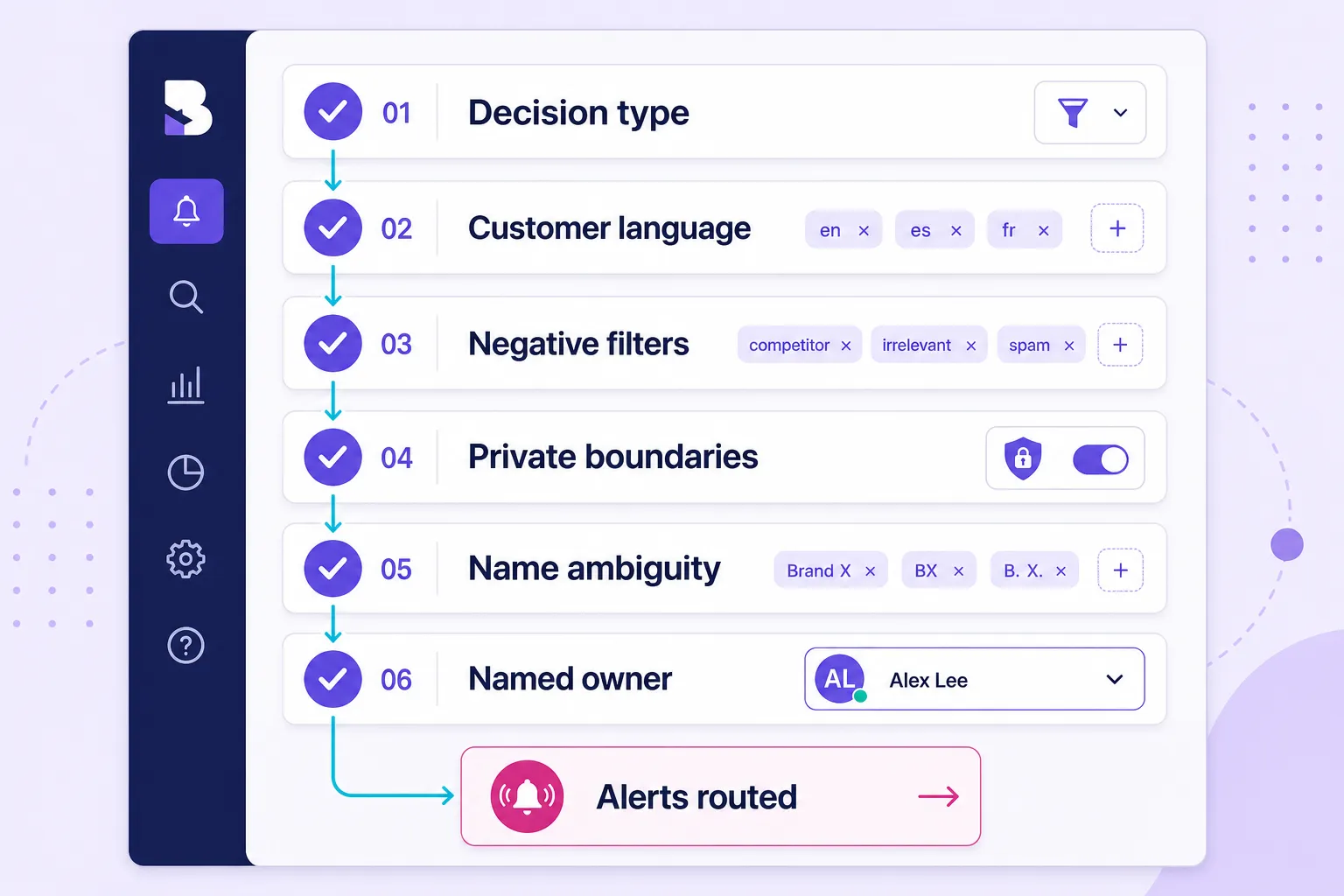
The setup process matters more than the tool. A messy system becomes another tab. A clean one becomes leverage. Follow these six steps in order.
- Separate alerts by decision type. Group them by what the owner should do: Reply Now, Investigate, Learn, Save, Correct. The label should tell the person what to do before they open the mention.
- Write queries in customer language. You say "workflow automation." They say "how do I stop copying data between tools." Pull phrasing from support tickets, review text, and sales calls, then add exact product names and competitor names.
- Define negative filters early. Most teams add positive queries and forget exclusions. Filter out job posts, coupon spam, stock tickers if your name overlaps, celebrities or sports teams with similar names, and syndicated duplicates. A good exclusion list saves more time than ten new alerts.
- Draw a clear line around private spaces. Alerts read public content. They cannot and should not reach into private Slack groups, closed Discord servers, login-only forums, or DMs. Respect that boundary, and treat those spaces as blind spots you manage through relationships and direct feedback, not scraping. Marketers also need to accept that private sharing, the "dark social" layer, will never fully surface in any alert feed. Alerts reduce blind spots. They do not eliminate them.
- Handle name ambiguity and language on purpose. If your brand is a common word, a place, or shares a name with another company, build tight Boolean rules and location or language filters from day one. For international brands, set separate alerts per language and account for transliterations and local slang, or you will drown in false positives from the wrong market.
- Assign an owner before launch. Every alert group needs a person or role, not a department. Route each priority band to a named owner with a target response time, and document the escalation path for negative mentions before the first public issue lands.
A Response Template Library You Can Steal
Speed collapses when people improvise wording under pressure. Draft short, pre-approved skeletons for your most common alert types, then personalize them.
- Outage or bug: "We can see this and we are on it. Here is the status link, and I will update this thread as it clears." Post fast, update publicly, never go quiet.
- Bad review with specifics: Acknowledge the exact issue, own the part you got wrong, move the fix offline, and return with the resolution so future readers see it closed.
- False or misleading claim: Correct the record once, calmly, with a link to the accurate source. Do not argue in replies. If it is spreading and demonstrably false, request platform moderation and update your own docs so the truth is easy to find.
- Competitor comparison thread: Add facts, not spin. Answer the actual buying question the person asked, and skip the sales pitch.
- Journalist or analyst query: Reply privately with a short, accurate clarification and an offer to talk. Do not debate in public.
The rule that ties these together: reply to correct or help, not to win. Some mentions deserve a public response, some deserve a quiet source correction, and a few deserve silence so you do not amplify a claim nobody else has seen yet.
Respond to the credible complaint before the loud one. Anger burns out. A believable review from a real user compounds for months.
How to Tell If Your Brand Mention Alerts Are Actually Working
Monitoring without measurement drifts back into a feed you skim. Track a small set of operational numbers so you can prove the system earns its place and prune the parts that do not.
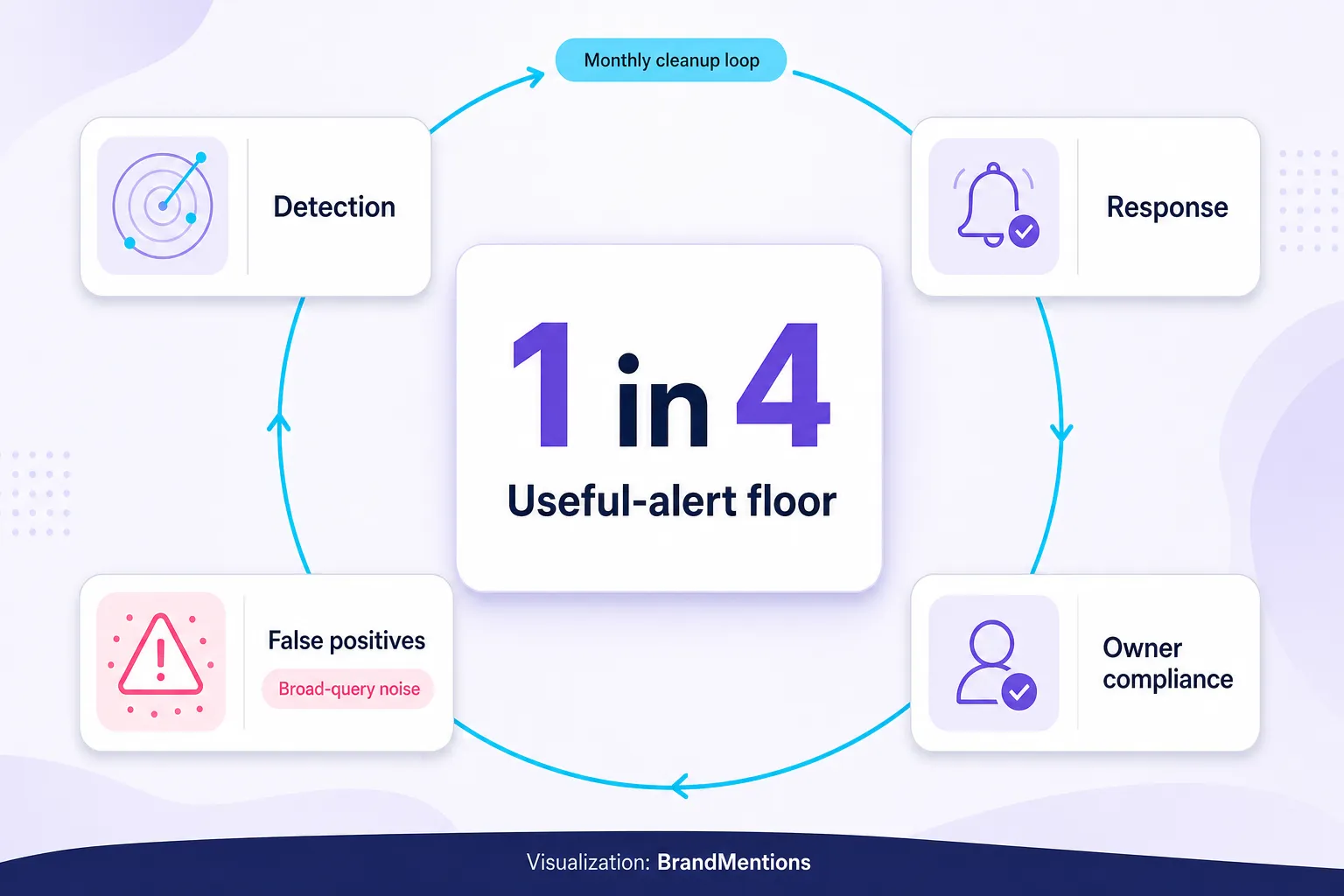
- Mean time to detection: the gap between a mention posting and your alert firing.
- Mean time to response: the gap between the alert and the owner acting.
- Useful-alert rate: the share of alerts that led to a real action. If it drops below roughly one in four, your queries are too broad.
- False-positive rate: how often an alert fires on the wrong entity or irrelevant noise.
- Owner response compliance: how often each priority band hit its target timing.
Review these monthly, then remove queries with no useful results, alerts nobody acted on, and old campaign terms. Add new product names, new competitors, new objection language, and new AI prompt patterns. This quiet cleanup is what keeps alerting alive past month two.
Tool Selection: What You Actually Need
You do not need the most expensive tool first. You need the right coverage and workflow. Pricing across this market ranges from free (Google Alerts, native platform inboxes) to enterprise contracts, and it changes often, so confirm current plans directly with each vendor before you commit.
| Need | Good starting point | When to upgrade | What to verify first |
|---|---|---|---|
| Free web alerts | Google Alerts | You need social, reviews, routing, or history | Does it cover the sources that matter to you? |
| Social customer care | Native inboxes plus social alerts | You miss untagged mentions or need assignment | Which platforms are included, and how are API limits handled? |
| Reputation management | Review platform alerts plus routing | You manage many locations or review sites | Can you track response time, owner, and status? |
| AEO and AI visibility | Manual prompt checks plus source alerts | AI answers influence your buyer journey | Can it track prompts, competitors, and source evidence? |
Competitors here have genuine strengths. Brandwatch, Meltwater, Talkwalker, and Sprout Social serve teams with larger social-intelligence, media-monitoring, or enterprise workflow needs. Google Alerts is a fair free web baseline. Native platform tools are best for owned engagement. For teams that want one workflow for web mentions, social mentions, sentiment triage, and AI mention checks without building their own platform connections, BrandMentions fits the niche of cross-channel mention monitoring with alert routing and deep historical data.
Whatever you choose, run one procurement test that few teams bother with: ask the vendor for the last 30 days of results for five of your real queries before you sign. Then check source coverage, false-positive rate, data retention, export access, and how the tool handles the platform limits above. If the sample results would not have changed a decision, the tool will not fix your workflow. And once you pick one, delivery is what makes it stick. A Slack alert integration that drops the right mention into the right channel means the person who should act sees it in seconds, not the person who happens to check email.
Frequently Asked Questions
Are Google Alerts enough for brand monitoring in 2026?
For a solo operator or small business with low mention volume, Google Alerts is a reasonable free start for indexed web and news. It has hard limits: it does not index social platforms like X, Reddit, TikTok, or Instagram, and it is not built for real-time reaction. For anything time-sensitive, social, or review-based, you need a dedicated alert tool alongside it.
What should I track besides my brand name?
Track product names, executive names, campaign phrases, competitor names beside comparison terms, complaint language, review terms, event names, and buyer questions. The highest-value alerts usually combine your brand with an intent word such as "alternative," "review," "pricing," "refund," "broken," "worth it," or "best for."
How fast do I actually need to respond to a brand mention?
It depends on the type. Sprout Social found 84% of consumers say response speed affects how they perceive a crisis, so route crisis and outage mentions to near real time. Reviews run slower: BrightLocal found 81% of consumers expect a response within a week. Legal and influencer mentions should prioritize accuracy over speed.
How do I set up brand mention alerts?
Work through six steps: separate alerts by decision type (Reply Now, Investigate, Learn, Save, Correct), write queries in customer language, define negative filters early to cut noise, draw a clear line around private spaces you cannot ethically monitor, handle name and language ambiguity with tight Boolean and location filters, and assign a named owner with a target response time before you launch. Start with four to six live alerts tied to real decisions rather than fifteen you will mute by month two.
Can brand mention alerts help with AI search and answer engines?
Yes, and this is the newer reason to run them. Answer engines describe your brand using third-party reviews, forums, and articles, and your search ranking does not predict that. Tracking how you are mentioned across those sources, plus periodically checking how ChatGPT, Perplexity, and Google AI Overviews describe your category, tells you what the models have learned so you can correct or reinforce it.
Conclusion: Collect Less, Catch More
The instinct with monitoring is to widen the net, track everything, and feel covered. The teams that actually save time do the opposite. They run a handful of sharp alerts tied to real decisions, route each one to the person who can act, measure whether the system catches things they would have missed, and let the rest go.
That discipline matters more now than a year ago, because the surfaces keep multiplying while the time to act keeps shrinking. Customers expect replies in hours. Reviews decide deals before a prospect visits your site. Rivals move in public. And a new layer, the AI answer, is quietly writing your brand's description for buyers you will never see click.
So do one thing this week. Open a blank list, write down the four to six decisions your mentions should change, and build exactly that many alerts. Name an owner for each, set a target response time, and delete anything that does not map to a decision. That is the whole discipline, and it is what turns monitoring from a chore you avoid into a signal that quietly does your busywork for you.
Filed under: Growth




3 comments