BrandMentions 2026 Product Updates: 18 New Features
BrandMentions updates in 2026 include YouTube Spoken Mentions, AI Reports, editable PowerPoint exports, Flash Alerts, audience demographics, and smarter AI filtering. These improvements help brands…

BrandMentions updates in 2026 include YouTube Spoken Mentions, AI Reports, editable PowerPoint exports, Flash Alerts, audience demographics, and smarter AI filtering. These improvements help brands and agencies discover relevant conversations, understand brand performance, and create reports for clients and stakeholders.
So far, we’ve published 18 product updates this year. Some introduce entirely new capabilities. Others make the tools you use every day clearer, more flexible, and easier to work with.
Together, they bring our Mention-to-Decision approach to life: Listen, Explain, Decide. Find the conversation, understand its significance, and give your team something useful to act on.
This roundup covers all 18 product updates published from January through October 2026, grouped by how they improve your workflow. Follow our updates page for new releases.
- 2026 at a Glance: Our Year of Updates, Month by Month
- Expanded News Coverage for More Complete Media Monitoring
- Discover When Your Brand Is Mentioned Inside YouTube Videos
- Understand Your Audience Better with Demographic Insights
- Find More Relevant Conversations with AI Filtering and Match Strength
- Get AI Help Where You Work with Flash Alerts, Digests, and the AI Assistant
- See the Bigger Picture with Redesigned Analytics, Brand Score, and Comparison
- Smarter Reporting with AI Reports, Editable PowerPoint, and Redesigned PDFs
- White-Label Emails and Centralized Client Reporting
- BrandMentions in Your Language, on Any Device
- Bring It All Together in Your Next Project
- Frequently Asked Questions
2026 at a Glance: Our Year of Updates, Month by Month
Eighteen updates is a lot to take in at once, so here’s the year at a glance.
We started by laying the groundwork: broader coverage, branded communication, and a smarter way to filter what you find. In spring, we brought AI closer to your everyday work. Over the summer, we turned your data into timely alerts and ready-to-share reports. And in autumn, we delivered our biggest wave of releases yet, from mentions spoken inside YouTube videos to a brand-new Overview.
- January: Expanded news coverage
- February: White-label email delivery and unified Reports, White Label, and Alerts management.
- March: Filter with AI and reusable Segments
- May: AI Assistant across the platform, editable PowerPoint exports, and Global Translation
- June: Flash Alerts and Custom AI Digests
- July: AI Reports
- August: An optimized mobile experience
- September: Redesigned Analytics, Demographics, and redesigned PDF and PPTX reports
- October: Spoken Mentions, Match Strength, the new Overview and Brand Score, redesigned Comparison, and redesigned PDF exports
Each update builds on the one before it. Better discovery gives filtering more to work with. Sharper filtering makes analysis clearer. And clearer analysis leads to reports worth sharing.
Expanded News Coverage for More Complete Media Monitoring
Your brand’s story unfolds across many channels. This year, we strengthened news discovery to help you capture more media coverage alongside the social, blog, forum, and other web mentions you already monitor
The January 2026 news coverage update expanded BrandMentions’ news collection to capture more mentions and improve the discovery of media coverage.
For PR and communications teams, a fuller picture of media coverage means more material for evaluating campaigns, following industry developments, and understanding where a story is gaining attention.
It also gives you a stronger foundation for the reports you share with stakeholders. Every useful analysis starts with the conversations you can find.
Discover When Your Brand Is Mentioned Inside YouTube Videos
A creator can recommend your product or explain what frustrated them about it without including your brand name in the video’s title or description.
Spoken Mentions is a BrandMentions feature launched in October 2026 that detects tracked keywords spoken inside YouTube videos by searching their transcripts.
Introduced in October, the feature searches YouTube video transcripts for your tracked keywords. Each result includes the relevant transcript, a timestamp, and a direct link to that moment in the video. Sentiment and emotion analysis sit alongside the mention, and you can filter these results with the rest of your monitoring data.
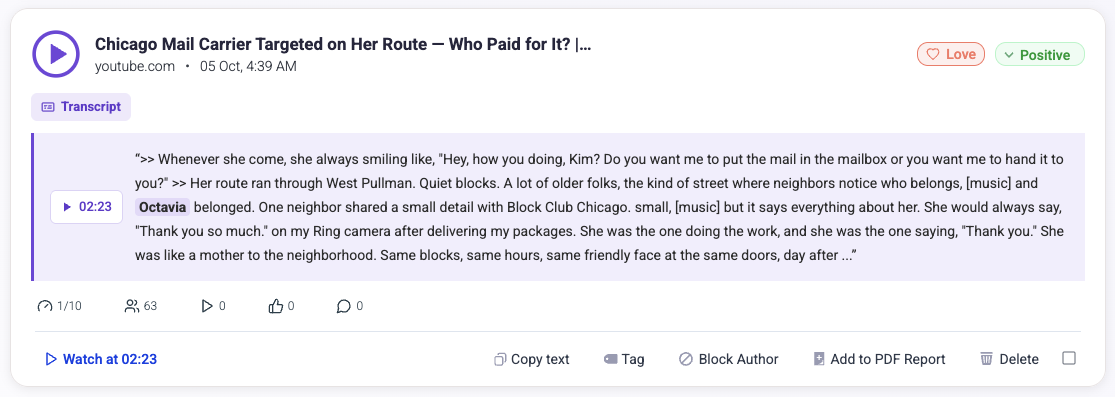
For brand teams, it’s another way to hear customer opinions. For agencies, it adds depth to client coverage. And for anyone researching competitors, it opens up conversations that written titles and captions don’t reveal.
Understand Your Audience Better with Demographic Insights
Audience Demographics is a BrandMentions feature launched in September 2026 that provides aggregate estimates of audience characteristics, including age, gender, location, interests, occupation, income, and education.
Explore age and gender distribution, countries and cities, interests, occupation signals, and income and education estimates.
Audience relationships and sentiment differences help you ask more specific questions about the conversations around your brand.
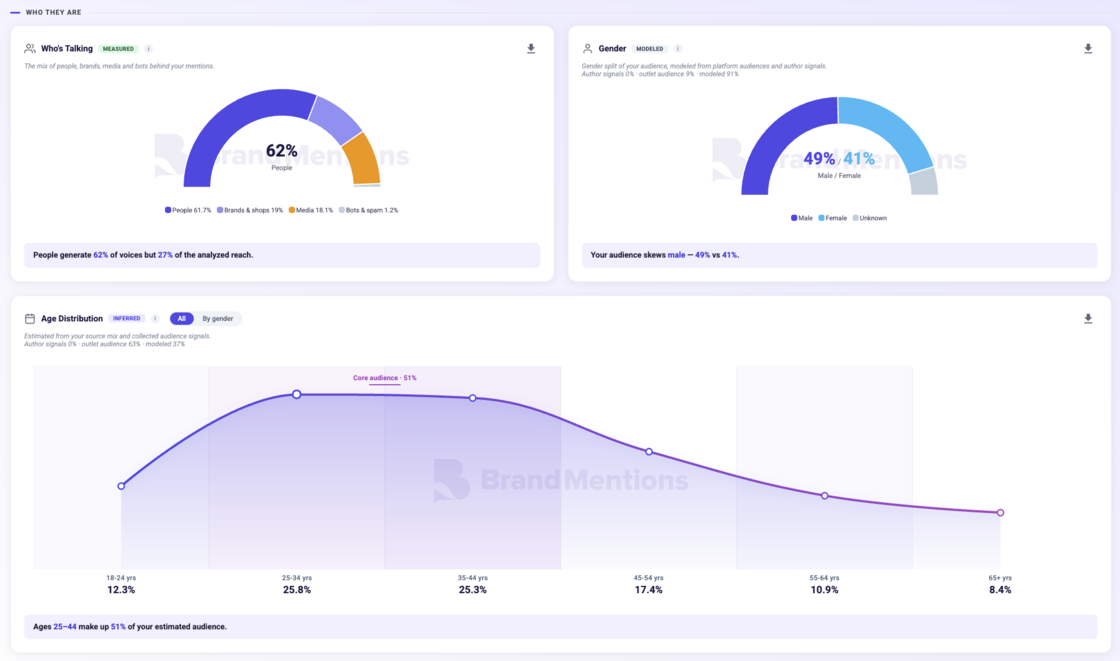
These are aggregate audience estimates built using public signals, publisher audience benchmarks, and modeling. They help inform research and marketing decisions; they don’t identify individual people.
Use them to explore whether your brand is reaching the audience you expected - or to spot a segment worth investigating further.
Find More Relevant Conversations with AI Filtering and Match Strength
Finding more conversations is valuable. Being able to focus on the right ones makes that coverage useful.
Filter with AI and Reusable Segments
Filter with AI is a BrandMentions feature launched in March 2026 that turns natural-language requests into filtered selections of mentions that you can save as reusable Segments.
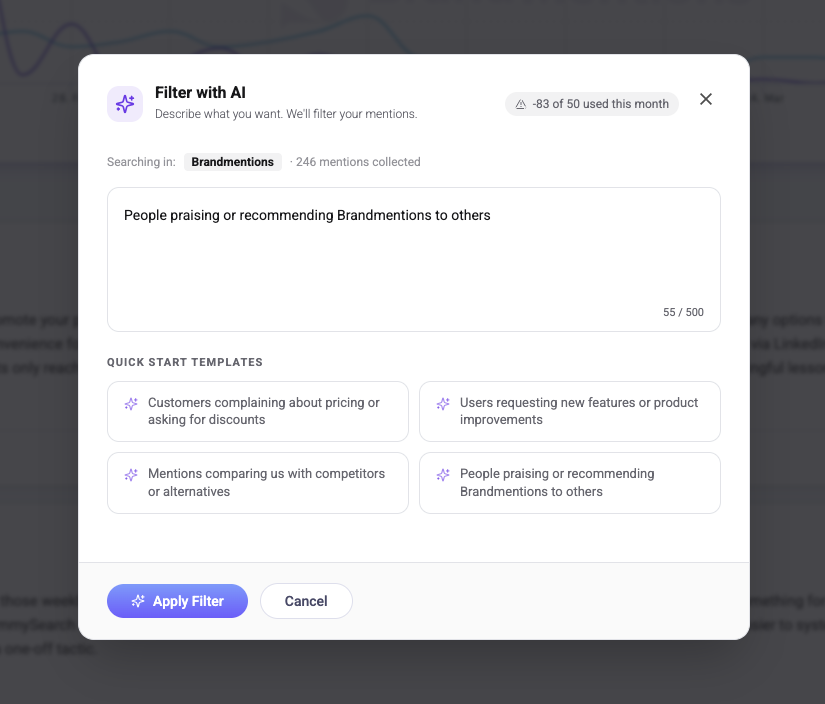
Describe what you want to find: pricing complaints, feature requests, recommendations, or discussions comparing your brand with a competitor.
You can write in your preferred language, then save the resulting selection as a Segment.
Those segments become reusable parts of your workflow. Return to them during your next review or build a report around a specific slice of the conversation.
For a product team, that could mean a recurring view of feature requests. For an agency, it could mean a focused report on the reactions to a client’s latest launch.
AI-Powered Match Strength
Match Strength is a BrandMentions feature launched in October 2026 that uses your project description to classify mentions as High, Medium, or Low relevance to the brand, product, or topic you’re monitoring.
Match Strength uses the description you provide in Project Settings to evaluate relevance in context.
You can filter mentions by High, Medium, or Low relevance, making it easier to review direct references or explore broader conversations.
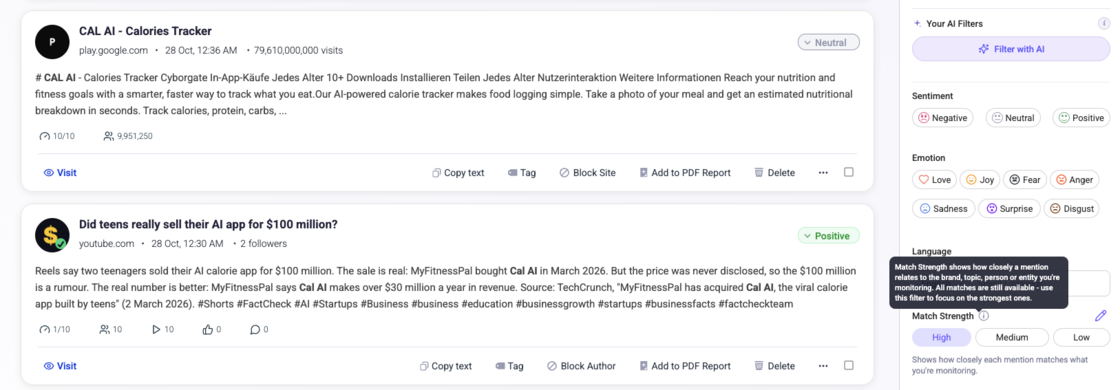
It’s especially useful for brands with common names, ambiguous keywords, or names shared with other businesses. Update your monitoring description, and existing mentions are automatically reclassified for Match Strength and sentiment.
You gain a more practical way to refine your feed as you learn what matters to your project.
Get AI Help Where You Work with Flash Alerts, Digests, and the AI Assistant
A useful insight shouldn’t require a long detour through your workspace. This year, we brought AI assistance closer to your daily tasks and made automated briefings more adaptable.
Flash Alerts and Custom AI Digests
Flash Alerts is a BrandMentions feature launched in June 2026 that lets you define monitoring triggers in natural language and receive an AI Digest when those conditions are detected.
Describe what deserves attention: a jump in mentions or reach, increasing negative sentiment, competitor activity, an emerging topic, or important brand news.
An AI Digest is a written briefing that summarizes important developments in your monitored conversations and explains their significance.
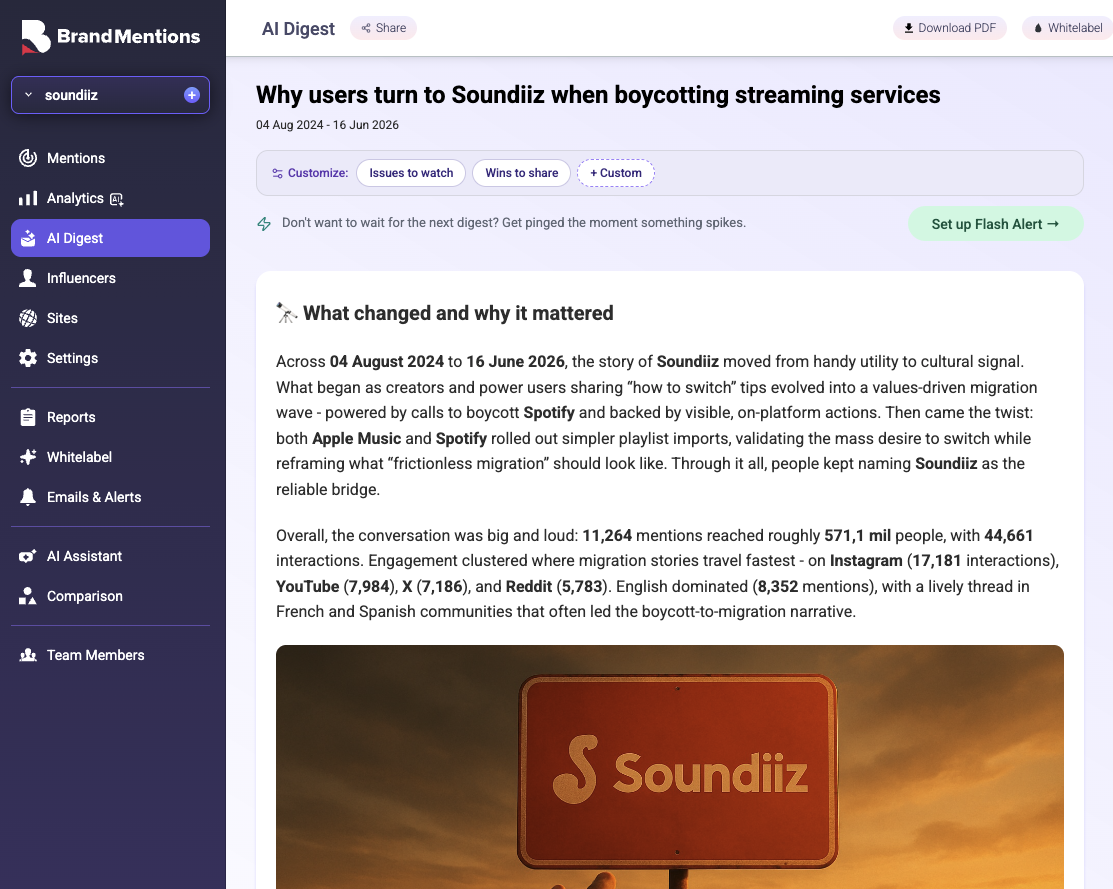
You can also customize the narrative. A CEO briefing might emphasize business implications, while a PR update focuses on reputation and developing risks. Digests can run on demand, on a schedule, or when a trigger occurs, with delivery to one or more email recipients.
That makes it easier to keep different stakeholders informed in a way that fits their responsibilities.
AI Assistant Access Across the Platform
The BrandMentions AI Assistant is a conversational tool for exploring your project data, with a May 2026 update expanding contextual access across the platform.
Whether you’re reviewing mentions, investigating influencers, comparing projects, or exploring reports, you can ask a question without leaving your current workflow. The assistant uses your project and viewing context to help investigate trends, sentiment changes, risks, and opportunities.
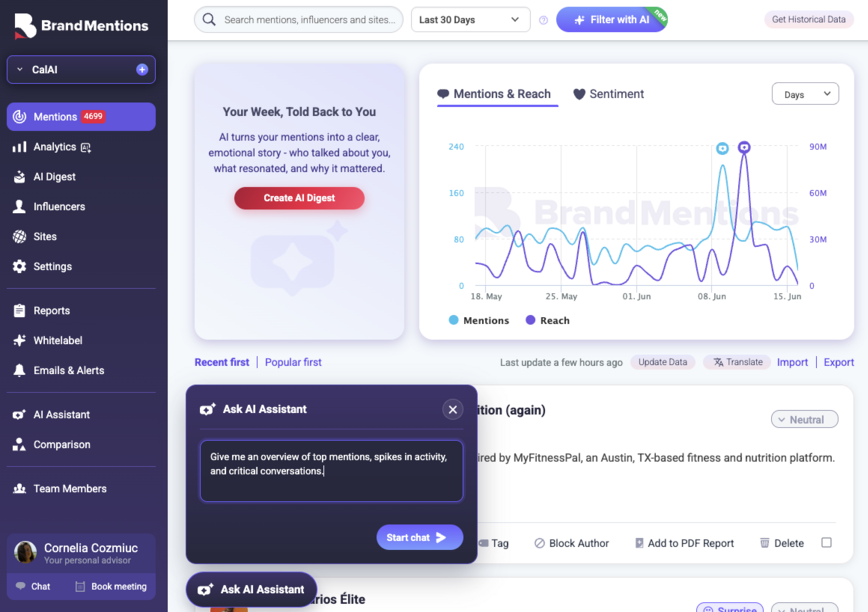
The same update made AI-generated filters easier to save and reuse as shortcuts. Questions and searches that matter to your team become easier to return to.
See the Bigger Picture with Redesigned Analytics, Brand Score, and Comparison
The first screen you open should help you get oriented quickly. The deeper analysis should help you investigate with confidence. We worked on both.
Redesigned Analytics
BrandMentions Analytics is the workspace for exploring mention volume, reach, sentiment, emotions, and conversation patterns, redesigned in September 2026 with clearer charts, stronger breakdowns, and AI-assisted interpretation.
Visual summaries beneath charts and AI analysis throughout Analytics help you explore the meaning behind the patterns.
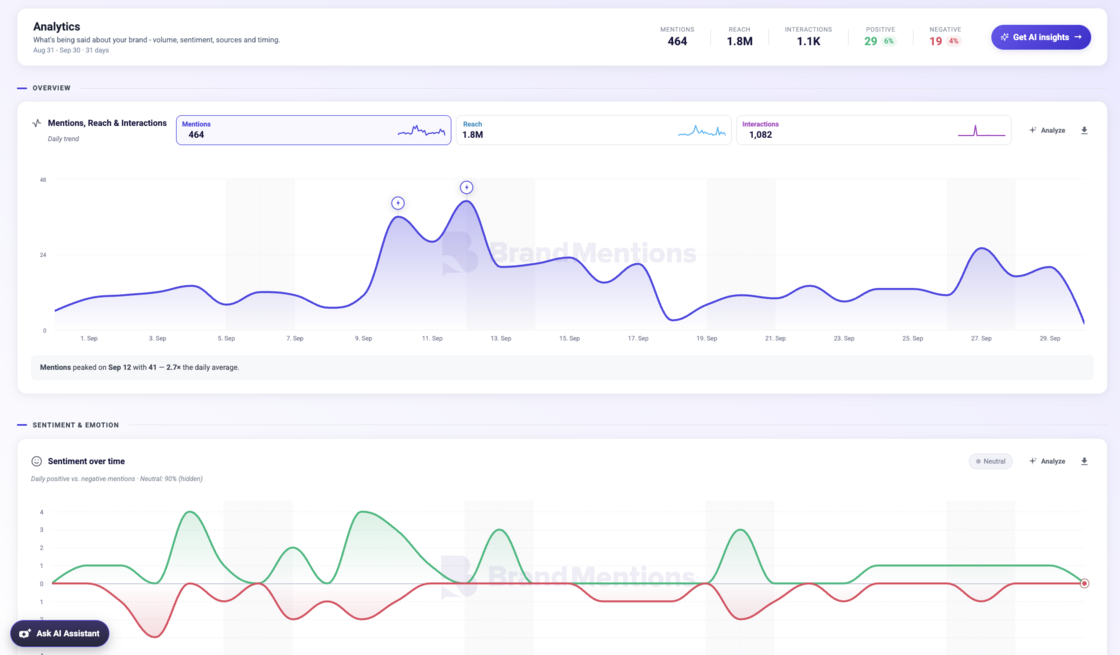
Whether you’re investigating a campaign, preparing a review, or following a developing story, the experience is designed to make everyday analysis easier to navigate.
New Overview Dashboard and Brand Score
The Overview dashboard, introduced in October 2026, brings AI Digest, mentions, reach, audience demographics, and top conversations into one BrandMentions workspace.
Brand Score is a BrandMentions metric introduced alongside the new Overview that summarizes brand performance on a scale from 0 to 100 and tracks its evolution over time.
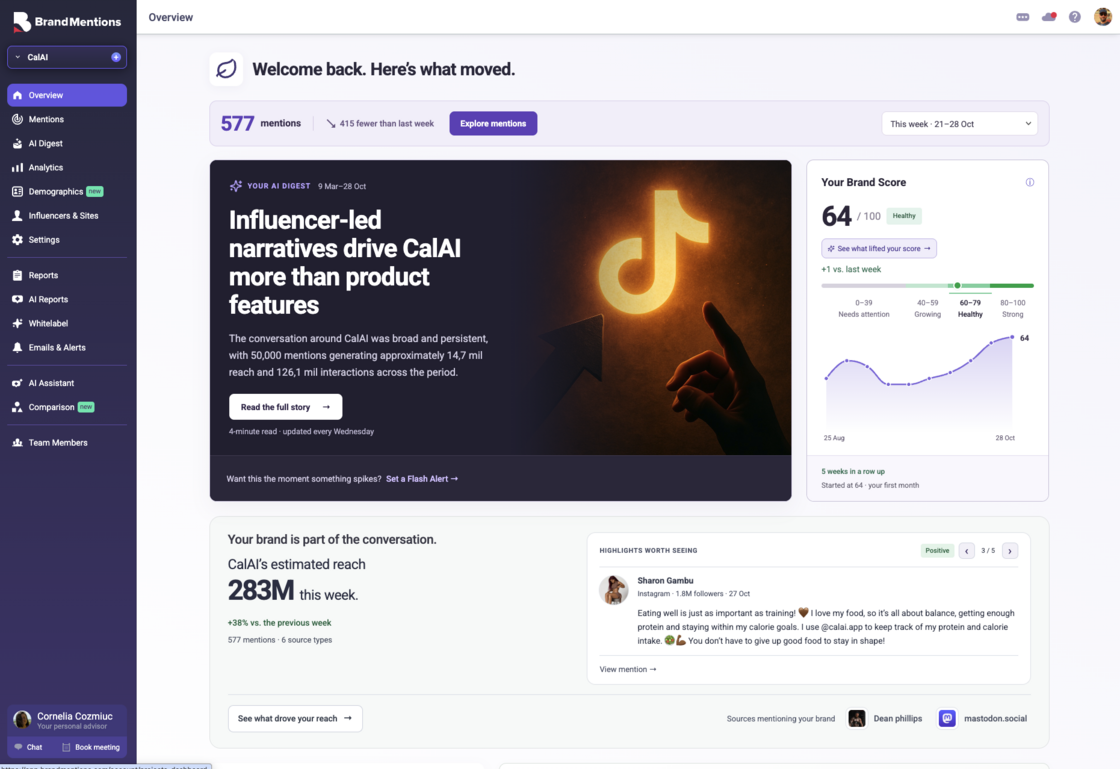
Start with the overview, see what has changed, then move directly into the mentions, analytics, or audience information you want to investigate.
It gives your monitoring routine a clearer starting point.
Redesigned Comparison
Comparison is the BrandMentions workspace for benchmarking projects and time periods, redesigned in October 2026 to bring analytics, audience demographics, filtering, and AI-generated insights together.
You can also compare different periods within the same project, bringing campaign changes and longer-term developments into focus.
The experience combines analytics and demographic comparisons, flexible filtering, AI-generated analysis, and branded PDF exports.
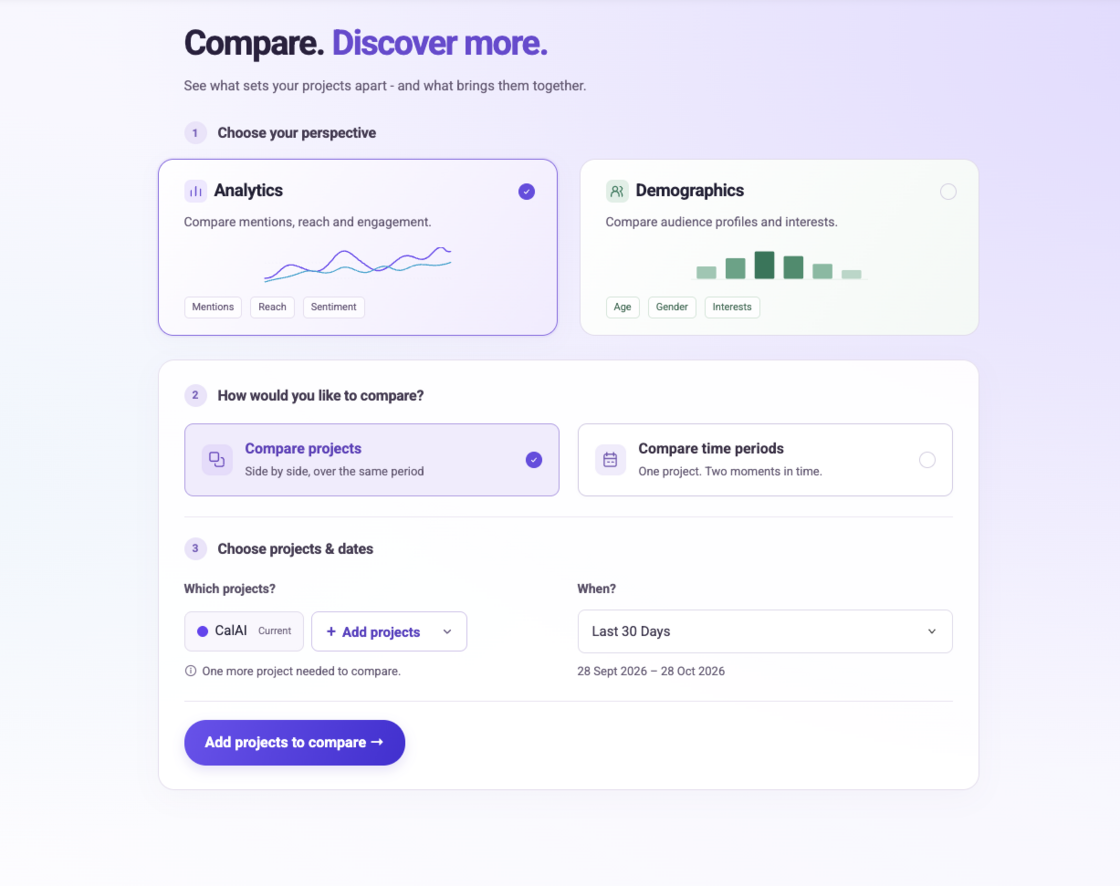
That gives you a better foundation for questions such as: How did the conversation change after our launch? Which competitor attracts a different audience? Where are we gaining attention?
Smarter Reporting with AI Reports, Editable PowerPoint, and Redesigned PDFs
A good report helps someone understand the situation and have a better conversation about what comes next. This year, we invested in how reports are created, edited, and presented.
AI Reports
AI Reports is a BrandMentions feature launched in July 2026 that turns project data into presentations with narratives, insights, charts, and conclusions. Choose the report type, period, language, and design, then review and personalize the result. You can edit slides, text, and insights, apply your branding, or ask AI to rewrite individual slides.
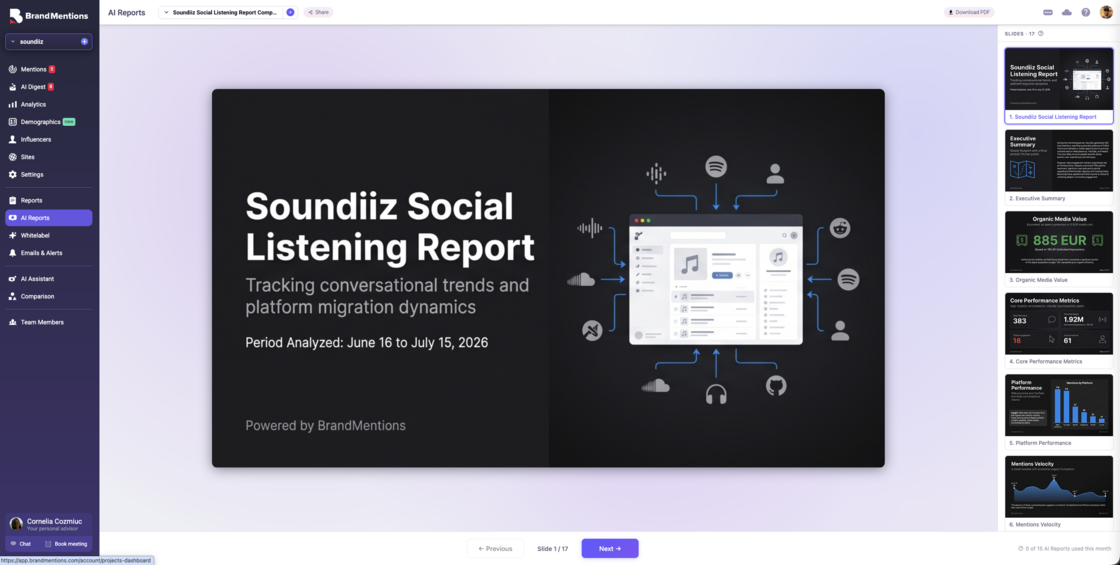
You keep control over the final result. Edit slides and text, customize the report for your audience, apply your branding, or ask AI to rewrite individual slides.
It provides a substantial starting point for your review, freeing you to focus on the interpretation and recommendations you want to share.
Redesigned Reports for PDF and PPTX
The September 2026 Reports redesign updated BrandMentions’ PDF and PowerPoint reporting experience with richer content, cleaner layouts, and customizable branding, text, and section order.
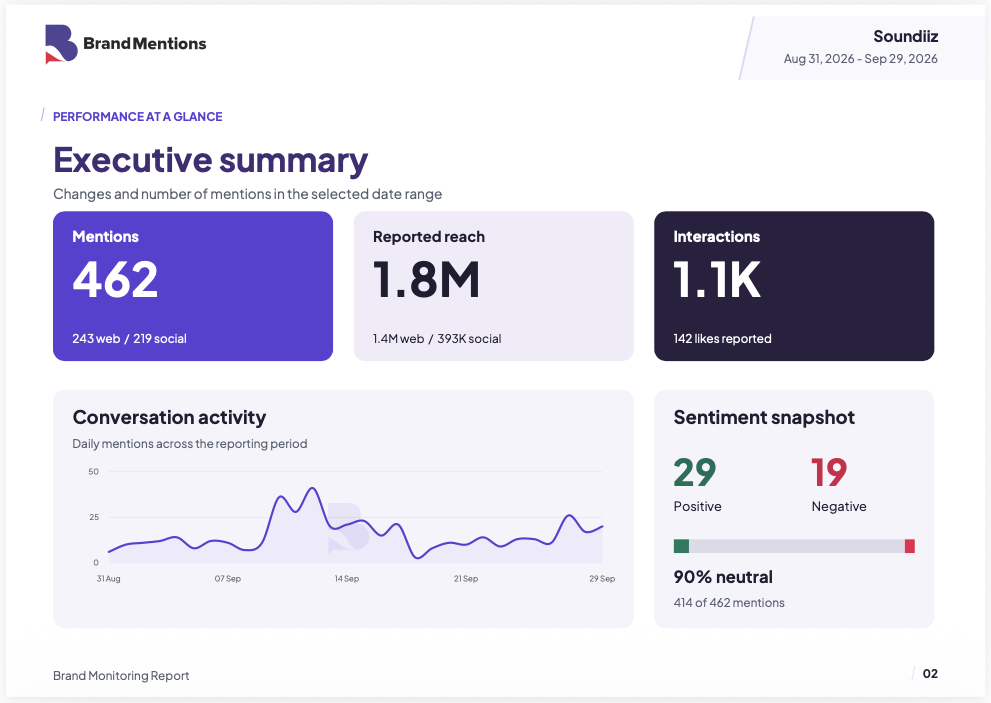
Customize titles, descriptions, sections, section order, color themes, and branding. Generate reports in 100+ languages, and include comparisons with another period or project.
The result is more flexibility over both what your report says and how it looks.
Fully Editable PowerPoint Reports
PowerPoint export is a BrandMentions reporting feature launched in May 2026 that produces native PPTX files with editable charts, data, text, and slide layouts.
Your charts, data, text, and slide layouts remain editable after export. Adjust a chart type, update a label, add a slide, or refine a recommendation before presenting.
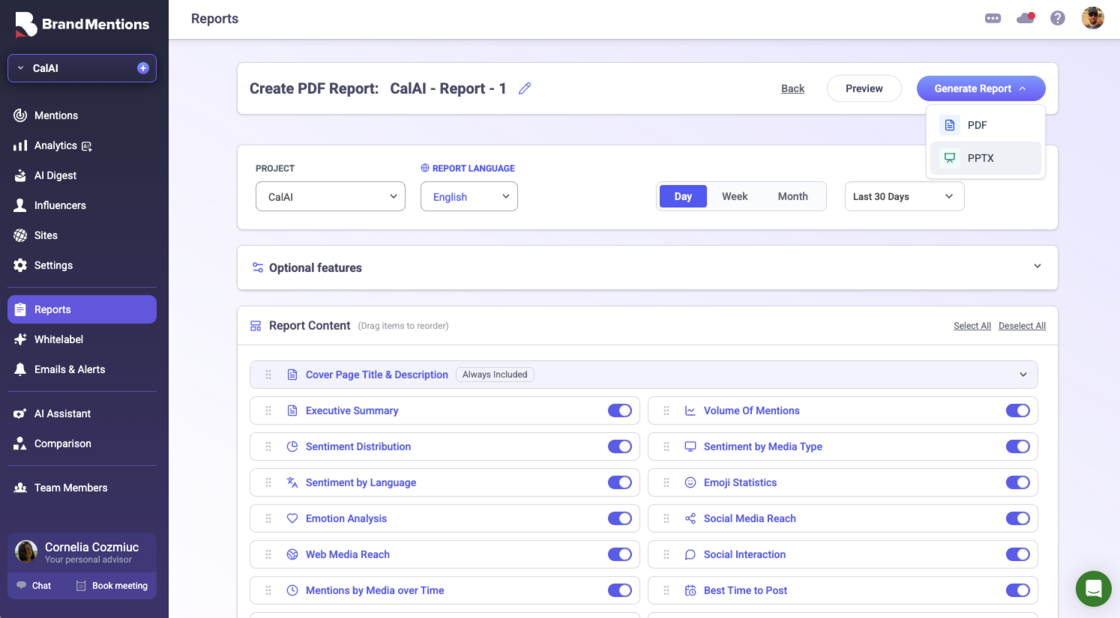
For agencies and reporting teams, that makes it easier to adapt the analysis to a particular client or meeting without rebuilding everything manually.
Redesigned PDF Exports Across Modules
The October 2026 PDF export redesign extended consistent layouts, typography, charts, and branding options across BrandMentions Analytics, Demographics, Comparison, and other reporting areas.
Refined typography, clearer charts, consistent covers, and coordinated tables and summaries give exported analysis a more polished presentation. Custom color themes and white-label support help make it your own.
Whether you’re sharing a quick comparison or a broader performance report, the presentation gets the same attention as the analysis.
For a practical framework and a worked example, see our guide on how to create a social listening report.
White-Label Emails and Centralized Client Reporting
When you work across multiple clients or projects, the details matter: where reports live, how alerts are managed, and whose name appears in the inbox.
Full White-Label Email Delivery
White-label email delivery is a BrandMentions capability introduced in February 2026 that enables Domain White Label accounts to send alerts, reports, and notifications from their own email domain.
Configure your sender name and address through SendGrid so alerts, reports, and notifications carry your identity.
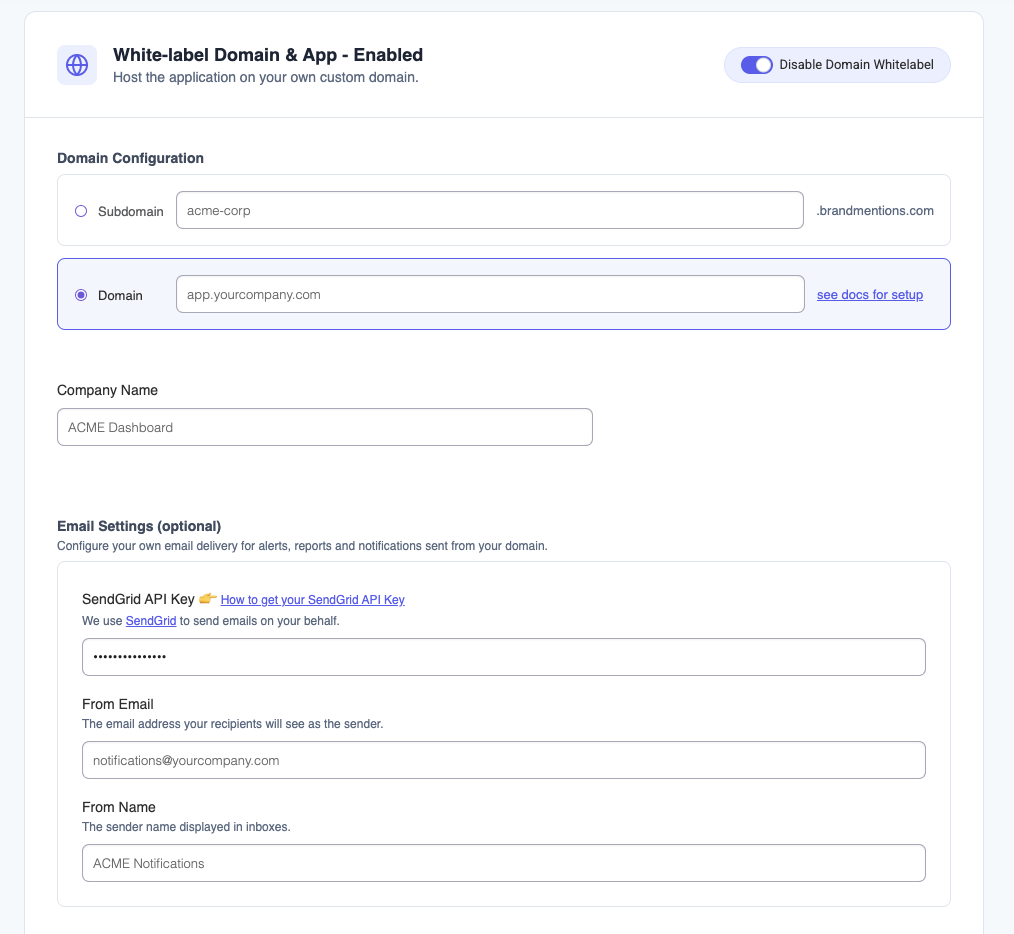
It extends the branded experience beyond the application and into the communications your clients receive.
Unified Reports, White Label, and Alerts Management
The February 2026 we reorganized BrandMentions’ reports, branding settings, alerts, and scheduled emails, making them easier to manage across individual projects or all projects.
Switch between the current project and all projects. Access report types from a unified hub. Manage alerts, scheduled reports, and digests in a central module, with a clearer setup for branding.
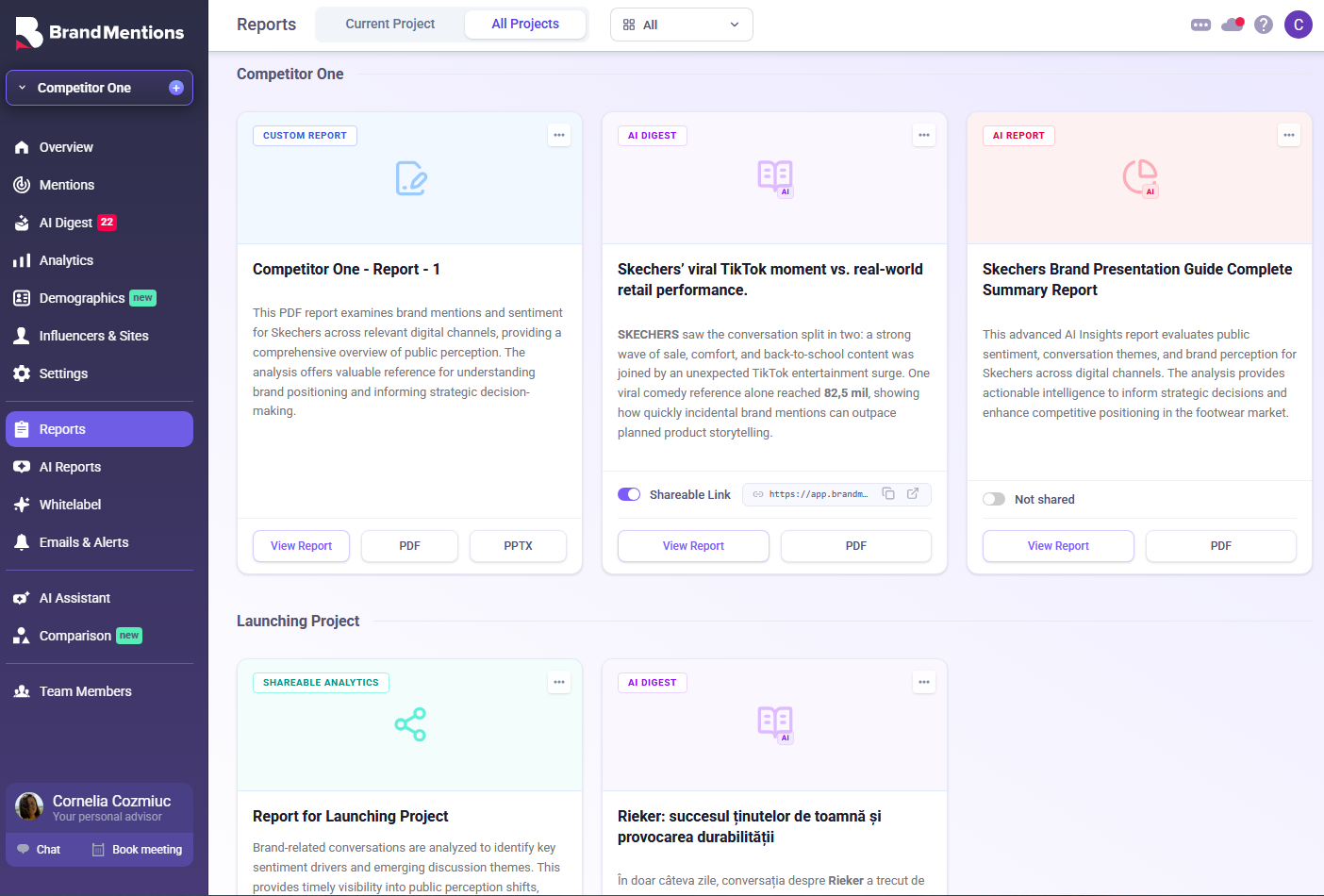
For a busy agency, those everyday improvements can make the workspace much easier to manage as the client roster grows.
White-label reports are available from the Expert plan. Full-Stack White Label, covering the domain, interface, reports, and email, is available on custom Enterprise plans.
BrandMentions in Your Language, on Any Device
Your monitoring should fit the way your team works - including its languages, locations, and devices.
Global Translation
Global Translation is a BrandMentions feature launched in May 2026 that lets users work in their preferred interface language and translate individual mentions or batches of mentions.
You can translate individual mentions or batches of mentions while keeping the original content available.
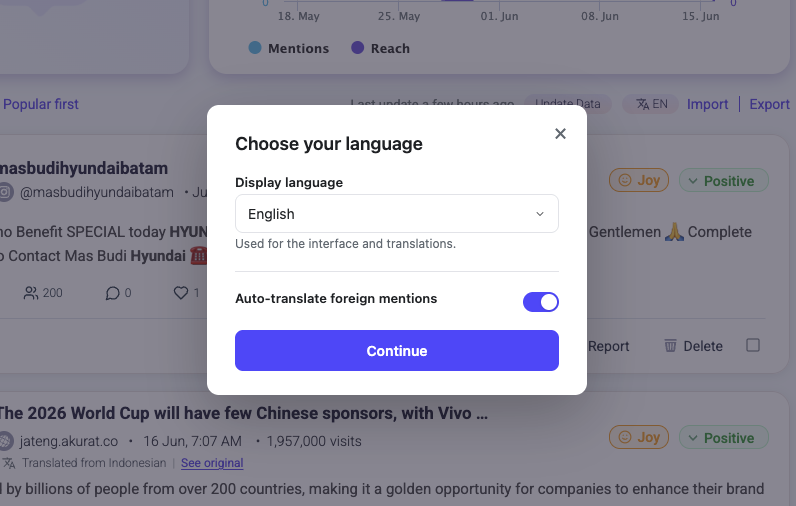
Combined with multilingual reporting and AI features, this makes international monitoring easier to handle inside one workspace. Colleagues can work with the same project while reading and interpreting the information in the language they prefer.
An Optimized Mobile Experience
The August 2026 mobile update optimized the BrandMentions web interface for reviewing mentions, reading AI Digests, exploring analytics and reports, and using the AI Assistant on mobile devices.
Review new mentions, read AI Digests, explore analytics and reports, or ask the AI Assistant a question from your phone.
When you’re traveling or moving between meetings, you can check a developing conversation and decide whether it needs immediate attention or a deeper review later.
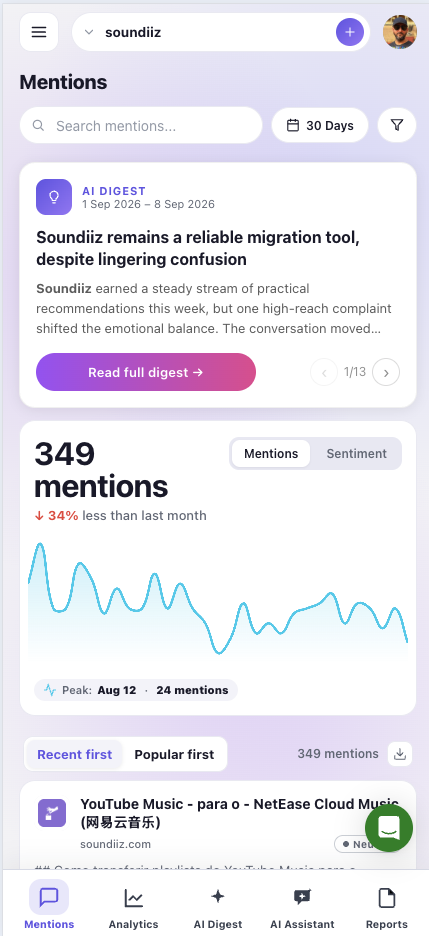
Your monitoring stays accessible when you’re away from your desk.
Bring It All Together in Your Next Project
The value of this year’s updates becomes clearest when you use them together.
Discover a mention inside a YouTube video. Refine the conversation with Match Strength. Save a useful segment. Ask the AI Assistant to help you investigate what changed. Compare the results with another brand or period, then create a presentation tailored to the people who need to see it.
That’s the BrandMentions we’ve been building in 2026: a more connected way to find conversations, understand their significance, and communicate a clear point of view.
If you’re already using BrandMentions, open your dashboard and explore the latest additions.
New here? Explore BrandMentions and start with the conversations around your own brand.
Frequently Asked Questions
Does BrandMentions detect brand names spoken inside YouTube videos?
Yes. BrandMentions’ Spoken Mentions feature searches YouTube video transcripts for tracked keywords, including references that don’t appear in the title or description. Results include the relevant transcript, a timestamp, and a link to that moment in the video.
Can I export BrandMentions reports to PowerPoint?
Yes. BrandMentions supports native PowerPoint exports in PPTX format. Charts, data, text, and slide layouts remain editable, so you can customize the presentation before sharing it with clients or colleagues.
What is the difference between AI Reports and PowerPoint exports?
AI Reports generates a presentation’s narrative, insights, charts, and conclusions from your project data. PowerPoint export provides an editable PPTX file that you can adjust in presentation software. AI Reports supports content creation, while PPTX export gives you flexibility after download.
Can BrandMentions alert me to negative conversations or unusual activity?
Yes. Flash Alerts lets you describe monitoring conditions in natural language, such as rising negative sentiment, spikes in mentions or reach, and competitor activity. When a trigger is detected, BrandMentions generates an AI Digest explaining the development.
Can I customize AI Digests for different recipients?
Yes. You can give instructions that shape a digest’s focus and writing style, such as a leadership briefing or a reputation monitoring update. Digests can be generated on demand, on a schedule, or when a trigger occurs, and sent to one or more email recipients.
How does BrandMentions filter out irrelevant mentions?
Match Strength uses your project description to classify mentions as High, Medium, or Low relevance. Filter with AI lets you describe the conversations you want to find and save useful selections as reusable Segments. Together, they help you focus your review on relevant results.
What is Brand Score?
Brand Score is a BrandMentions metric from 0 to 100 that provides an at-a-glance view of brand performance and how it changes over time. It appears in the Overview dashboard alongside other information you can use to investigate the underlying conversations.
Does BrandMentions provide audience demographics?
Yes. BrandMentions provides aggregate audience insights covering characteristics such as age, gender, geography, interests, occupation, income, and education. These insights use public signals, publisher audience benchmarks, and modeling; they are estimates rather than verified profiles of individual people.
Can I compare my brand with competitors or previous periods?
Yes. BrandMentions Comparison lets you compare multiple projects or different time periods within the same project. You can explore analytics and demographic differences, apply filters, use AI-generated analysis, and export branded PDF comparisons.
Can I use my own branding on reports and emails?
Yes. White-label reports are available from the Expert plan. Full-Stack White Label is available on custom Enterprise plans and can extend your branding across the application, domain, reports, and email delivery.
Can I use BrandMentions in another language?
Yes. Global Translation lets you use the interface in your preferred language and translate mentions individually or in batches while retaining the original content. BrandMentions reports also support more than 100 languages.
Can I use BrandMentions on my phone?
Yes. BrandMentions has a mobile-optimized web interface for reviewing mentions, reading AI Digests, exploring analytics and reports, and accessing the AI Assistant. You can use it from your phone when you’re away from your desktop.
Filed under: Product


