How to Monitor a TikTok Hashtag Campaign in 2026: A 5-Step Tracking and Reporting Process
A vendor-neutral, 5-step process for monitoring a TikTok hashtag campaign in 2026 - from naming tags and registering the sound to owned and earned tracking, a live dashboard, weekly reviews and a f…


TikTok hashtag campaign monitoring is the process of tracking posts, creators, sounds, mentions and performance metrics connected to a TikTok campaign hashtag. It helps brands measure participation, engagement, sentiment and campaign outcomes even though TikTok no longer shows a public aggregate hashtag view count.
Quick Answer: To monitor a TikTok hashtag campaign in 2026, track qualifying posts, the campaign sound, per-video performance, creator participation and earned mentions across TikTok and other channels. Use a written participation rule, compare videos at similar ages, flag paid amplification, and report observed views separately from reach. Because TikTok no longer provides a public aggregate hashtag view count, reliable campaign measurement now depends on combining several signals rather than relying on one headline metric.
How do you monitor a TikTok hashtag campaign in 2026?
A reliable TikTok hashtag campaign monitoring setup has four core parts:
- Count qualifying posts against a written participation rule.
- Track the campaign sound as a second identifier, so you catch participants who skipped the tag.
- Capture earned mentions and comments on and off TikTok.
- Compare creative through matched-age video comparisons (24 hours, seven days) rather than raw totals.
Report "observed views across N qualifying videos, captured on this date," keep participation, exposure, reputation and outcome measures in separate columns, and never sum views into reach.
Never sum views into reach.
Metrics you can still track for a campaign hashtag: post counts, per-video views, likes, comments, shares, saves/favourites, watch time and completion, traffic source, unique participating creators, earned UGC share, remix share, share of observed brand mentions and human-reviewed sentiment - with availability depending on your access route.
Key Takeaways
- The aggregate in-app hashtag view counter is gone - the Center for Countering Digital Hate documented the removal on February 7, 2024 - but post counts and every per-video metrics (views, likes, comments, shares, saves, watch time, traffic source) remain available.
- Build the number from the bottom up: count qualifying posts against a written participation rule, then report "observed views across N qualifying videos, captured on this date."
- Track the campaign sound as a second identifier, saving the canonical sound URL and sound ID, so you catch participants who skipped the caption tag - and never derive sound-only participation by dividing one count by another.
- Never sum views into reach. The Media Rating Council's cross-media standards require deduplication across the reporting period for any unique-audience claim.
- Compare creative only at matched ages (24 hours, seven days), and flag Spark Ads amplification with a field on every post row, because boosted views accrue to the original organic post.
- Keep an append-only evidence ledger and versioned queries, so every headline number traces to a post, a date, a definition and a decision.
The 5-Step Process at a Glance
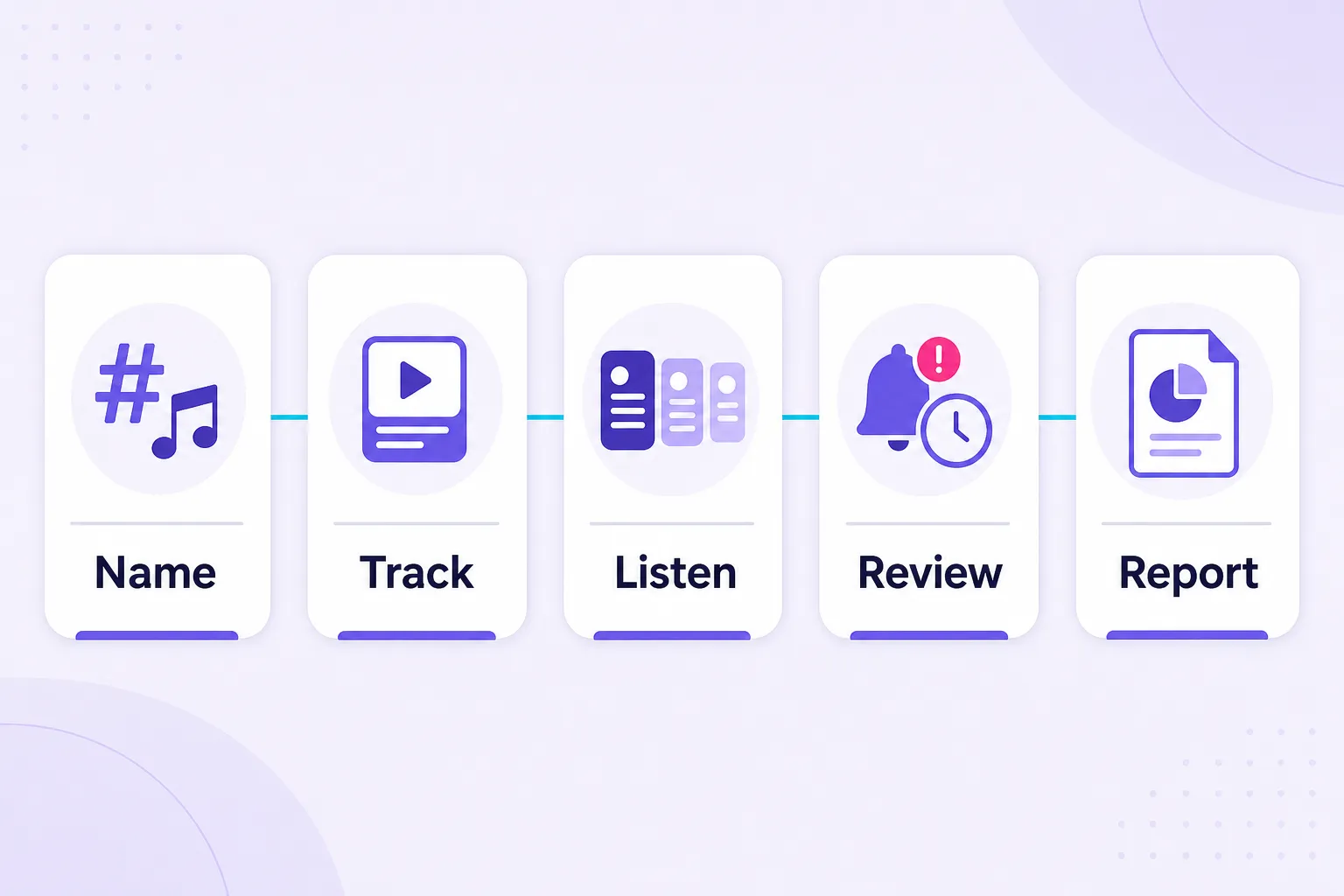
- Step 1: Name the tags and register the sound - assign each tag a job, lock the sound ID, test the mechanic from an ordinary account, and write the participation rule. Output: a signed participation rule, a sound register and a timestamped baseline.
- Step 2: Set up owned tracking - verify which metrics your access route actually exposes, standardise the formulas, and add a paid-amplification field. Output: a metric inventory, agreed formulas and a documented owned baseline.
- Step 3: Build earned tracking and the dashboard - configure cross-channel listening, coverage-test it against known posts, version your queries, and set privacy rules. Output: a coverage-tested listening project, a versioned query log and a live dashboard.
- Step 4: Review weekly and escalate risk - run the cadence, sample properly for sentiment, and separate off-brief content from harmful content. Output: a decision log with named owners and reason-coded risk queues.
- Step 5: Report - sequence the deck on the AMEC framework so activity never masquerades as impact. Output: a traceable report that separates participation, performance, conversation, outcomes and risk.
Three reference sections support the sequence rather than interrupt it: the Campaign Evidence Ledger (the schema behind Steps 2 - 5), Mid-Flight Recovery if you have already launched without a baseline, and a Worked Example that runs seven records end to end.
The goal is not the biggest number. It is a number you can explain.
This guide exists because most TikTok hashtag reporting we still see in 2026 is built around a metric that stopped existing in 2024, and nobody in the room asks where the number came from until a finance director does. So before you add another tool to the stack, answer one question - what decision will its data change? - because if you cannot name the decision, you are buying a dashboard, not an insight.
What Changed in TikTok Hashtag Analytics?
January 2024: Creative Center stopped arbitrary hashtag lookup.
February 2024: aggregate hashtag views disappeared from public hashtag pages.
2026: research-data fields and collection behavior continued changing.
At a Glance: Which Monitoring Approach Fits Your Scenario?
| Your scenario | Best monitoring approach | What makes it work, and what constrains it |
|---|---|---|
| Zero-budget launch | Native analytics plus a manual participation register | Your own posts give first-party performance data, the hashtag and sound pages give daily volume, and a spreadsheet does the rest. The binding constraint is staff time, so use it only while your team can genuinely review every discovery. |
| Creator-led participation | Parallel hashtag and sound tracking | Parallel hashtag and sound tracking helps distinguish weak participation from participation that simply omitted your caption tag. |
| PR exposure and reputation risk | Cross-channel listening with named alert owners | Campaigns that break out get discussed on Reddit, in newsletters and in trade press before they appear in your weekly review, and a TikTok-only setup cannot see that. |
| Mid-flight optimisation | Matched-age video comparisons | Compare posts after equivalent observation windows (24 hours, seven days) before you touch the creative brief, because a three-day-old video losing to a three-week-old video proves nothing. |
| Enterprise scale and multi-market campaigns | A documented evidence ledger with locked query versions | At thousands of posts across languages, the reporting risk shifts from "we cannot find the content" to "we cannot reproduce last week's number." |
| Stakeholder credibility | Separate participation, exposure, reputation and outcome measures | Keeping incompatible metrics out of the same total is what makes the report defensible six months later. |
Can You Still Measure a TikTok Hashtag Campaign After the View Counter Disappeared?
Yes, and the honest version of the answer is better for you than the old one was. Here is what changed in TikTok hashtag analytics, and what still works:
- The public in-app hashtag view counter is gone. The Center for Countering Digital Hate documented the removal on February 7, 2024, with before-and-after evidence across 21 hashtag pages. TikTok's advertiser trend surfaces still display "Posts & Views" for hashtags they choose to surface, so "hashtag views no longer exist anywhere" is inaccurate. Neither number is a campaign census.
- Post counts survived, along with many important per-video metrics, including views, likes, comments, shares and, depending on your access route, saves, watch time and traffic-source data
- Data availability changes by access route and by month. TikTok's developer changelog records a February 26, 2026 research-pipeline change affecting public videos ineligible for For You recommendation, and a May 21, 2026 addition of
favorites_countto several research endpoints. Check what your route exposes today rather than inheriting a template. - Owned analytics structurally understate a campaign that works. Native reporting covers content published through accounts you control. The more people participate, the smaller the share of the campaign your own dashboard can see.
- Summed video views are not reach. The Media Rating Council's cross-media standards require deduplication across the reporting period for any unique-audience claim. Adding views, follower counts and publisher traffic does not produce one campaign reach figure.
- Collection method changes the apparent campaign. The August 2026 WhichTok? preprint compared TikTok's Research API, Pyktok and Apify across five collection endpoints and found substantial differences in the hashtag and keyword results returned, including which time periods and popularity levels were represented.
What exactly did TikTok remove, and when?
Two changes happened close together and get conflated constantly. In January 2024, TikTok restricted Creative Center so users could no longer look up arbitrary hashtags, leaving a surfaced set of trending tags per industry and region. In February 2024, the aggregate view total came off the in-app hashtag pages, which is the removal CCDH documented on February 7.
What did not happen is a total blackout. TikTok's advertiser-facing trend pages still show "Posts & Views" for the hashtags they surface, which is why you will occasionally see a legitimate 2026 hashtag view figure. Your campaign tag almost certainly will not appear there, and even when a tag does, that counter is a platform-side display for a trending term, not an audited count of your activation.
Build the campaign from the bottom up: three populations
So build the report from the bottom up. Maintain two populations and never merge them: tagged participation (relevant campaign posts carrying the campaign hashtag) and extended participation (relevant campaign posts found through the sound, brand references or manual review, including posts that omit the tag). Keep surrounding conversation in a third bucket, because a news article or a comment thread about your campaign matters enormously and is still not a campaign submission.
Report "observed views across N qualifying videos, captured on this date" and put the capture date in the slide. The number will be smaller than the counter you used to quote, and it will be the first campaign figure nobody can argue with.
TikTok Hashtag Metrics You Can Track in 2026
TikTok hashtag analytics in 2026 are more fragmented than they used to be, but there is still plenty you can measure. You can track hashtag post counts, qualifying campaign posts, unique creators, per-video views and engagement, saves, watch time, traffic sources, sound-based participation, sentiment and share of voice depending on your access route.
The key is to separate activity, exposure, participation and outcomes instead of combining them into one headline number. The table below shows which TikTok hashtag metrics are still available, where to find them and what each one actually tells you.
| Metric | Available? | Where | What it means |
|---|---|---|---|
| Hashtag post count | Yes | Hashtag page | Activity volume |
| Aggregate hashtag views | Not on public hashtag pages | — | Removed from public hashtag pages |
| Video views | Yes | Individual videos / analytics | Exposure events |
| Likes/comments/shares | Yes | Video level | Interaction |
| Saves | Depends | Analytics/access route | Intent signal |
| Watch time | Owned/authorized | TikTok Studio | Content consumption |
| Sound video count | Yes | Sound page | Audio usage |
How Do You Check TikTok Hashtag Analytics in 2026?
There are three places to look, and each one answers a different question:
- TikTok Studio (your own and contracted creator posts). Open TikTok Studio from your profile menu to read per-video views, likes, comments, shares, saves/favourites, watch time, completion and traffic source (For You, Search, Sound, Profile). This is exact but narrow: it only covers accounts you control, plus creator reports you contracted for.
- The hashtag page post count (activity volume). The displayed post count is the surviving public hashtag metric, and it is cumulative since the tag's first use - so screenshot it with a timestamp before launch and report the delta, not the absolute. The aggregate in-app view total is no longer there: CCDH documented its removal on February 7, 2024, and Creative Center stopped supporting lookups of arbitrary hashtags in January 2024, while advertiser trend surfaces still display "Posts & Views" for tags TikTok chooses to surface.
- The sound page video count (participation that skipped the tag). Save the canonical sound page URL and sound ID, then track the sound page count alongside the hashtag page count. Do not compute sound-only participation by dividing one count by the other; classify posts individually and deduplicate by post ID.
Together those three give you activity volume, participation and per-video performance - the raw material for the owned tracking setup in Step 2 and the earned tracking in Step 3.
How Is Hashtag Monitoring Different From Sound Monitoring?
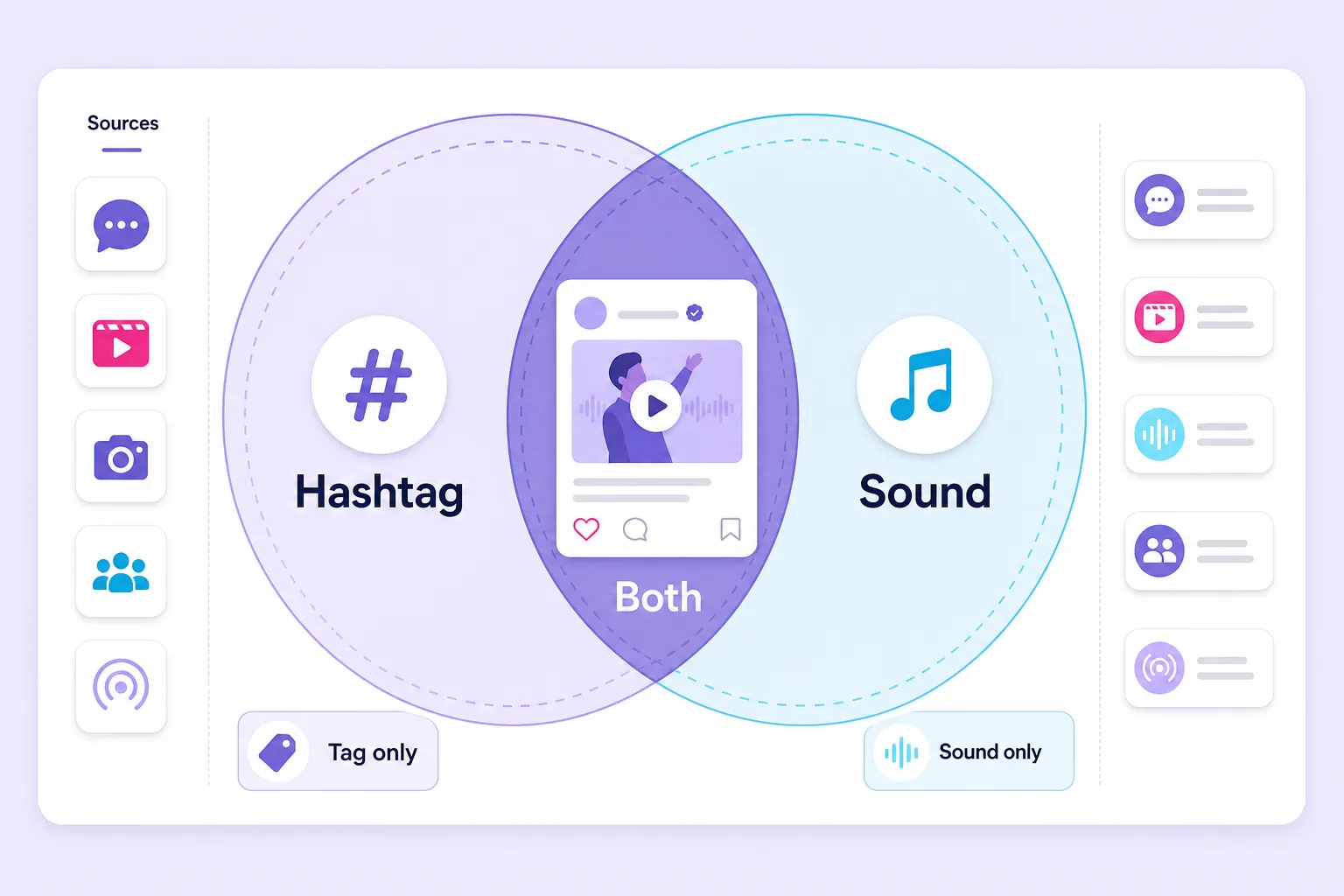
They track two distribution paths that overlap partially, and the size of that overlap is something you measure rather than assume.
Hashtag monitoring captures intentional labelling. A creator typed your tag into the caption, which is a clean attribution signal and the reason the hashtag page post count moves. Sound monitoring captures participation through the audio, whether or not the creator ever typed your tag.
| Hashtag monitoring | Sound monitoring | |
|---|---|---|
| What it captures | Intentional caption labelling | Participation through the audio, tag or no tag |
| Stable reference | The exact tag string and its misspelling variants | Sound page URL and sound ID (titles can be edited) |
| Attribution strength | Clean: the creator typed your tag | Requires human relevance confirmation per post |
| Listening coverage | Found by keyword-based text matching | A sound title as a keyword finds text references only, not every video that used the audio |
| Main failure mode | Misses participants who forgot the tag | Counts unrelated uses of your audio as participation |
Here is where a lot of 2026 guidance goes wrong mathematically. You cannot derive sound-only participation by dividing the sound page video count by the hashtag post count. Sound-only participation is the sound set minus its intersection with the hashtag set, which means you have to classify posts individually and deduplicate by post ID. Published overlap percentages floating around the industry are not reproducible, so measure your own and report it.
Which three groups should you track from day one?
- Group 1 - Hashtag plus approved sound: posts carrying both campaign identifiers, your cleanest and least ambiguous participation evidence.
- Group 2 - Hashtag, no approved sound: posts that labelled themselves correctly but used different or no audio.
- Group 3 - Sound only, no hashtag: verified campaign participation found through the audio, with the caption tag missing.
Group three is the diagnostic. If it grows fast, your brief is under-communicating the tag, which is a fixable creative problem rather than a participation problem.
Why Native TikTok Analytics Can Understate a Hashtag Campaign
Because native reporting is scoped to content published through accounts you control. A hashtag campaign exists to make other people publish. Success and blind spot grow together.
Think about what sits outside that scope: every independent creator video, every Duet and Stitch, every comment thread on those videos, every Reddit dissection, every trade write-up calling the idea clever or cringe. That is the owned vs earned media split applied to a single activation, and it is why the two tracking systems are not redundant. Owned tracking tells you how your content performed. Earned tracking tells you whether the campaign happened at all.
There is a second, quieter reason native data understates things. TikTok documents that creator tools are available to Personal and Business accounts and that feature availability varies by region and by app or web experience. Reporting templates built from a screenshot of somebody else's account routinely include fields your account does not expose, which produces blank cells that later get filled with guesses.
Native analytics vs. listening: the core difference in execution. Native data is exact and narrow, giving you precise figures for content you control. Listening data is broad and bounded by coverage rules, giving you a documented sample of content you do not control. Put them in separate columns and never sum them into one total reach line.
| Native analytics (TikTok Studio) | Social listening | |
|---|---|---|
| Scope | Accounts you control, plus contracted creator reports | Public content you do not control, bounded by coverage rules |
| Character of the data | Exact and narrow | Broad and documented as a sample |
| Unique fields | Watch time, completion, traffic source | Comments, off-platform coverage, competitor mentions |
| Best question it answers | How did our content perform? | Did the campaign happen at all, and what was said? |
| Reporting rule | Separate columns; never summed into a single reach line | Separate columns; never summed into a single reach line |
Do Hashtagged TikTok Videos Show How Many Views the Hashtag Generated?
No. Video views show how many views the participating videos received; they do not establish how many views were caused by the hashtag.
Metricool's 2026 TikTok study, published May 12, 2026, analysed 2,314,756 posts from more than 92,000 accounts and reported that the For You page generated seven out of every ten views in its dataset. That is useful context for how distribution works on the platform. It is observational, and it does not isolate the contribution of any individual hashtag.
TikTok's own explanation of its recommendation system describes multiple contributing factors, including user interactions, video information such as sounds and hashtags, and watch behaviour. It does not publish fixed weights. So when someone tells you saves carry more algorithmic weight than likes, or that videos need 48 to 72 hours before distribution begins, treat those as working heuristics from practitioner experience, not documented platform rules. They may still be useful. They are not evidence.
Say "observed views on qualifying campaign videos," not "views generated by the hashtag." If you need a business-impact claim, agree the evidence before launch: tracked links can support an acquisition report, and a properly designed lift test can address incrementality. A rising view counter supports neither.
Step 1: Name the Tags, Register the Sound and Write the Participation Rule
Output: a signed participation rule, a sound register with the canonical sound ID, a tested participation mechanic and a timestamped pre-launch baseline.
Naming is a measurement decision disguised as a creative one, and sound is where the legal exposure lives. Start with rights, because the U.S. Copyright Office's guidance for musicians distinguishes the underlying musical composition from the sound recording, and those can carry separate ownership.
Give each tag a distinct job
The branded, campaign and community structure is a useful organising framework used across professional campaign teams. It is not a TikTok requirement and it does not mean every post must carry exactly three tags.
| Role | Example | Monitoring purpose | Measurability |
|---|---|---|---|
| Branded | #YourBrand | Ongoing brand conversation and halo effect | Measure the delta over the campaign window, never the absolute |
| Campaign | #YourBrandDeskReset | The specific activation | Fully measurable if it starts near zero |
| Community | #DeskSetup | The surrounding interest group you are entering | Treat as distribution, not attribution |
That last row matters more than it looks. You cannot separate your effect from the rest of a community tag's traffic, so counting community-tag posts as campaign participation inflates every downstream number. Someone posting a desk setup has not joined your desk-reset campaign, and a sound hashtag marketing strategy treats those two facts as different.
Before you approve the campaign tag: search the exact spelling plus the misspellings people will actually type, check for unrelated or unsafe existing meanings in every target market, confirm two people who have never seen it can type it after hearing it once, and record existing post count with a timestamped screenshot. If the tag already has non-zero volume, you have not failed, you have simply inherited noise you must document as your baseline.
How many hashtags should a campaign post use? On hashtag quantity, the widely repeated claim that one to three tags outperform five or more does not trace to published TikTok documentation. What is defensible is the reporting argument: the fewer tags a creator uses, the less ambiguity you face when deciding whether a video belongs to your campaign. Treat tag count as an attribution-hygiene choice, not a ranking hack.
Register the sound as a second identifier
Save the canonical sound page URL, the displayed title, the originating account and the sound ID where you can retrieve it. Titles can be edited by the uploader, so the ID and URL are your stable references. Brief creators to use that specific sound entry rather than "the campaign song."
You will discover alternate uploads and edited versions. Keep a sound register, review the content of each variant, and only fold a variant into campaign counts after a human confirms relevance.
On clearance, be precise. TikTok recommends its Commercial Music Library for business use, and also permits original sounds or outside music where the required rights are held and the Music Usage Confirmation obligations are met. So "Business accounts can only use the Commercial Music Library" overstates the restriction. Ask your rights owner or legal lead to confirm territories, creator participation, paid promotion and off-platform reuse in writing, and require licence evidence rather than trusting an "original sound" label.
The pre-launch functional test nobody runs
A live sound page and a cleared licence do not prove the participation mechanic works. Test it as a participant would, using an ordinary personal account outside your brand organisation, in each priority market.
- Search the sound title the way a creator would. Does it surface?
- Record a video using the sound from the sound page. Does it attach correctly?
- Duet and Stitch the brand's launch post. Are those permissions actually enabled on that post?
- Post with the campaign hashtag, then check the hashtag page for it after a few hours. Note how long indexing took.
- Confirm comments are open on the posts where you intend to run community management.
Campaign launches can stall because of something as simple as a disabled Stitch setting. Ten minutes of testing here saves you a launch-day scramble you cannot undo.
Write the participation rule before anyone films
One paragraph, applied consistently by whoever owns the tracker:
Count a post as participation when it falls inside the campaign window, sits in a target market, and demonstrably follows the campaign prompt. Record whether it used the campaign hashtag, the approved sound, both, or another verified campaign identifier.
Add the dates and reporting time zone, the paid creator roster, the primary KPI, the explicit exclusions, and the name of the person who adjudicates edge cases. Ambiguity resolved in week one costs nothing. Ambiguity resolved in week four rewrites your whole dataset.
The reuse-ready yield: count the content your team can legally use, not just the content it can find.
Track the share of qualifying UGC that carries documented creator permission plus sound clearance for your intended reuse. Keep it separate from participation. A permissions gap changes what you can do with a post, not whether the post exists, and conflating the two makes a successful campaign look thin.
Step 2: Set Up Owned TikTok Hashtag Tracking and Choose Metrics That Still Exist
Output: a per-route metric inventory, standardised formulas, a documented owned baseline over a stated comparison window, and a paid-amplification field on every post row.
Availability is not a fixed property of the platform, which is why this step starts with TikTok's own change log rather than a metrics list. The TikTok developer changelog records a February 26, 2026 Research Tools pipeline change covering public videos ineligible for For You recommendation, and a May 21, 2026 addition of favorites_count to several research endpoints.
Read that as a standing instruction. Field availability and the population of content a route returns both change over time, so verify by access route and date instead of inheriting last year's template.
Where do you find hashtag campaign analytics in the TikTok app?
Open TikTok Studio from your profile menu, then do five things before launch: confirm access for the reporting owner, write down which metrics your account actually exposes, save a baseline over a documented comparison window, register every planned owned and contracted creator post, and agree creator reporting permissions and delivery dates in the contract rather than after the fact.
Two access routes people confuse
TikTok's Research API is restricted to approved academic and non-profit researchers, and its Research Tools FAQ explicitly excludes creators, advertisers and commercial users. So you will not be querying it. Its field list is still worth reading as an inventory of what the platform stores per video.
One caveat that gets misused: voice_to_text appears as a returned field, not as a permitted query condition, and the keyword condition searches video descriptions. The existence of a transcription field therefore does not prove you can search spoken audio, and no vendor claim should be accepted on that basis.
The same FAQ documents research-specific latency: new videos can take up to 48 hours to enter its search engine, and statistics can take up to ten days to update. Do not generalise those delays to commercial listening vendors, and do not use research documentation to set your own alert expectations. Test your actual alert latency with a known post instead.
What to track, and what each field really means
| Metric | Source or calculation | What it establishes | Watch out for |
|---|---|---|---|
| Displayed hashtag post count | Hashtag page, trend surfaces where shown | Contextual activity volume | Cumulative since the tag's first use; report the delta from a timestamped baseline |
| Qualifying campaign posts | Count of unique eligible post IDs | Observed participation | Requires your written participation rule to be reproducible |
| Unique participating creators | Distinct creators behind eligible posts | Breadth, not just volume | Ten thousand videos from 200 accounts is a different story than from 9,000 |
| Per-video views | Public display, native analytics, creator report | Exposure events | Not unique people; not additive into reach |
| Likes, comments, shares | Post-level counters | Recorded interaction volume | Captured at a moment in time; log the capture date |
| Saves / favourites | Native analytics or an exposed counter | A separate intent signal | Availability varies; do not convert missing into zero |
| Watch time and completion | Authorised analytics only | Creative performance | Unavailable for content you do not control |
| Traffic source (For You, Search, Sound, Profile) | Native analytics, own posts | Which discovery paths carried your content | Directional for your posts only; not campaign-wide proof |
| Earned UGC share | Independent posts ÷ all qualifying campaign posts | Participation with no known commercial relationship | A share, so it cannot exceed 1 when classified correctly |
| Remix share | Qualifying Duets, Stitches and remakes ÷ qualifying participant posts | Creative adaptation | Separate native Duet/Stitch from manually classified remakes |
| Share of observed brand mentions | Your mentions ÷ mentions across a fixed comparison set | Relative conversation volume | Not market share; freeze the brands, sources, languages, dates and matching rules |
| Sentiment | Human-reviewed classification against a stated target | Audience attitude | Specify sample size and what the opinion was aimed at |
Two things belong in the bin: aggregate in-app hashtag views, and any third-party "hashtag view estimate" presented without its method. If a vendor shows you a metric that appears neither in your own analytics nor in TikTok's documented fields, ask how it was produced before it reaches a slide.
Standardise the formulas, then stop arguing about them
Engagement rate by views = (likes + comments + shares) ÷ video views × 100
At campaign level, divide summed interactions by summed views across the same eligible post set. Averaging post-level percentages weights a 400-view video the same as a 4 million-view video, which is occasionally what you want and usually not.
Save rate = saves ÷ views × 100, calculated only across posts where both fields exist.
If you want saves inside a broader engagement rate, fine, but name that version explicitly and keep the coverage set consistent. This is where the widely quoted "average brand engagement rate" figures fall apart: they rarely state the numerator composition or the denominator, and a rate that includes saves is not comparable to one that does not. The defensible benchmark is your own account's rate over the 30 days before launch, with earned creator posts compared against a creator cohort rather than against your brand account.
Separate post age from reporting period
Reporting tools do not all mean the same thing by "this period." Sprout Social's Post Performance Report documentation selects posts published within the chosen date range while several exported metrics describe lifetime performance. A date filter does not automatically isolate activity earned during those dates.
The three-clock check: publication counts participation, discovery measures your collection, and capture dates the performance evidence.
An older video you found today is not a new submission. Its current views are not views earned today. Keep three separate timestamp columns and most reporting disputes disappear.
The Spark Ads contamination nobody accounts for
If you promote an organic creator post through Spark Ads, TikTok documents that views and engagement generated by the promotion accrue to the original organic post. Read the Spark Ads help documentation before you build the reporting.
Two consequences, both easy to get wrong. You cannot add the boosted post's public totals to your ad platform totals, because you will double count. And you cannot present that post's growth as organic participation performance, because part of it was purchased.
Fix it with a field, not a footnote. Record paid amplification status (yes / no / unknown) plus the ad reference on every post row, and exclude amplified posts from organic benchmark calculations or report them as a separate cohort.
Step 3: Build Earned Tracking and a Live TikTok Hashtag Analytics Dashboard
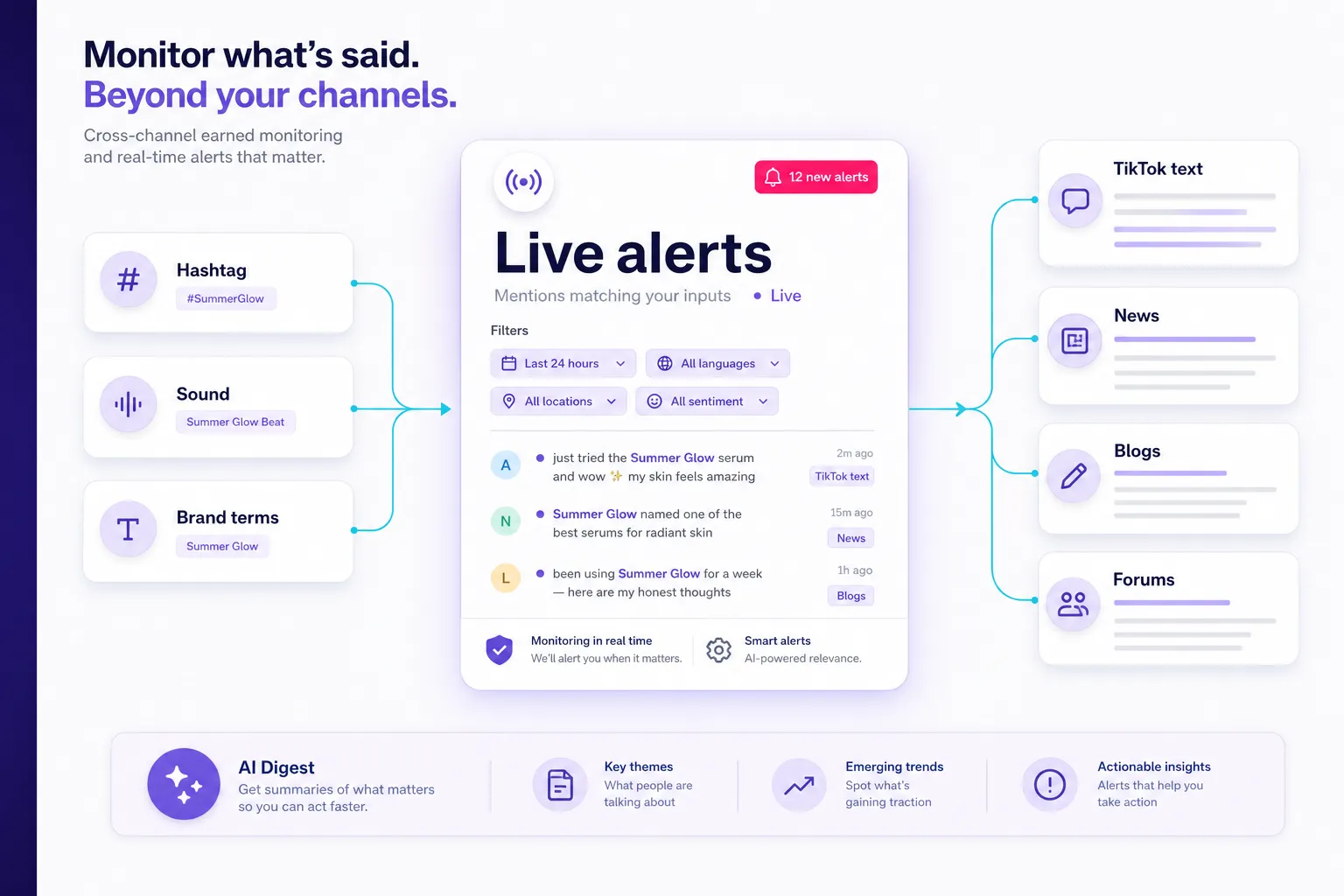
Output: a coverage-tested listening project, a versioned query log, a live dashboard with participation and risk panels, and a written privacy and retention rule.
Earned tracking answers the question owned analytics structurally cannot: what did everyone else make, and what did they say? The evaluation criteria that actually matter are TikTok coverage depth, alert latency, source breadth beyond TikTok, and sentiment quality on short slang-heavy text. Our comparison of TikTok listening tools works through those trade-offs vendor by vendor.
Which tool should you use for TikTok hashtag tracking?
| Tool | Best for | TikTok scope | Key constraint |
|---|---|---|---|
| BrandMentions | Cross-channel campaign alerting from one project covering TikTok plus news, blogs and forums | Public TikTok captions, descriptions and comments (documented supported mention types), alongside social, news, blogs and forums | A text-listening scope: a sound title as a keyword finds textual references, not every video that used the audio. Enable Real-Time Monitoring, because the documented default is daily checking |
| Meltwater | Teams wanting a TikTok Marketing Partner suite | Joined the TikTok Marketing Partners programme on March 3, 2025, with hashtag, comment and reply tracking described at the time as forthcoming | Verify current feature status directly rather than assuming the announcement describes today's product |
| Sprinklr | Large distributed teams needing deep workflow and archive features | Enterprise listening and workflow scope | Enterprise setup time |
| Brandwatch | Large distributed teams needing deep workflow and archive features | Enterprise listening and archive scope | Enterprise setup time |
| Sprout Social | Teams that want publishing and listening in fewer logins | Combined publishing plus listening | Reporting semantics: its Post Performance Report selects posts published in the chosen range while several exported metrics describe lifetime performance |
| Hootsuite | Teams that want publishing and listening in fewer logins | Combined publishing plus listening | Coverage-test against known posts before you rely on it for campaign discovery |
Choose against the constraint that actually binds you: budget, headcount, or how fast you need to know something went wrong.
How do you set up cross-channel campaign alerting?
For cross-channel campaign alerting, BrandMentions can cover TikTok text mentions alongside news, blogs and forums from one project.
You can monitor campaign hashtags, brand and product names, handles, common misspellings and competitor terms, then use the results to follow participation, conversation volume, sentiment, emerging themes and share of voice. Real-time monitoring can also help surface new mentions and potential issues faster.
Test coverage before you trust a single alert
Build a known-post checklist and see what each route finds, misses, or finds late:
- An owned post carrying the campaign hashtag.
- A creator post mentioning the brand with no hashtag.
- A relevant comment on someone else's video.
- A verified sound-only participation post.
- An off-platform article or forum thread.
Record the result per route. This is a coverage check against known items, not an estimate of how much of TikTok you can observe, and it is the only honest way to describe your monitoring scope in a report. The fundamentals of how to track TikTok mentions beyond your own account are worth reading before you finalise the keyword list, so it is complete rather than patched in week three.
Ask any provider five questions before launch: historical availability, refresh frequency, comment depth, export format, and how deleted content is handled.
Keep query changes visible
The August 2026 *WhichTok?* preprint compared TikTok's Research API, Pyktok and Apify across five collection endpoints and found substantial differences in the hashtag and keyword results returned, including which periods and popularity levels were represented. One important caveat that gets dropped when this paper is cited: it was published in August 2026, but its collection ran across August 2025, before the documented 2026 research-pipeline changes. The methodological warning holds. The specific endpoint findings are not a live capability audit.
The denominator lock: a query expansion can manufacture growth with no new audience activity.
Save every query version. If you add a misspelling or a new source mid-campaign, annotate the change, tag backfilled discoveries separately from newly published content, and rerun the prior comparison period under the same rules where you can. Otherwise week four looks like a breakout when it was a keyword edit.
The most expensive monitoring mistake is not missing a mention. It is reporting a growth curve you cannot reproduce because somebody improved the query on a Wednesday.
Set a privacy and retention rule on day one
You are about to collect handles, comment text, screenshots and records of content people later delete. Decide the rules before the volume arrives, not after legal asks.
- Store public URLs, post IDs and handles. Do not accumulate personal data you have no processing basis for.
- Restrict tracker access to named team members, and keep exports out of open shared drives.
- Timestamp every screenshot with its capture date, and redact bystanders and non-public identifiers before anything enters a deck.
- Set a retention window tied to report sign-off, and delete raw comment text after it.
- When content is deleted or removed, mark the record unavailable with its last observation and remove stored copies where you are required to.
That last point solves a real tension. You need historical records so the report stays auditable, and you need a deletion path so you are not warehousing content a creator withdrew.
Step 4: Review Weekly and Escalate Risk Immediately
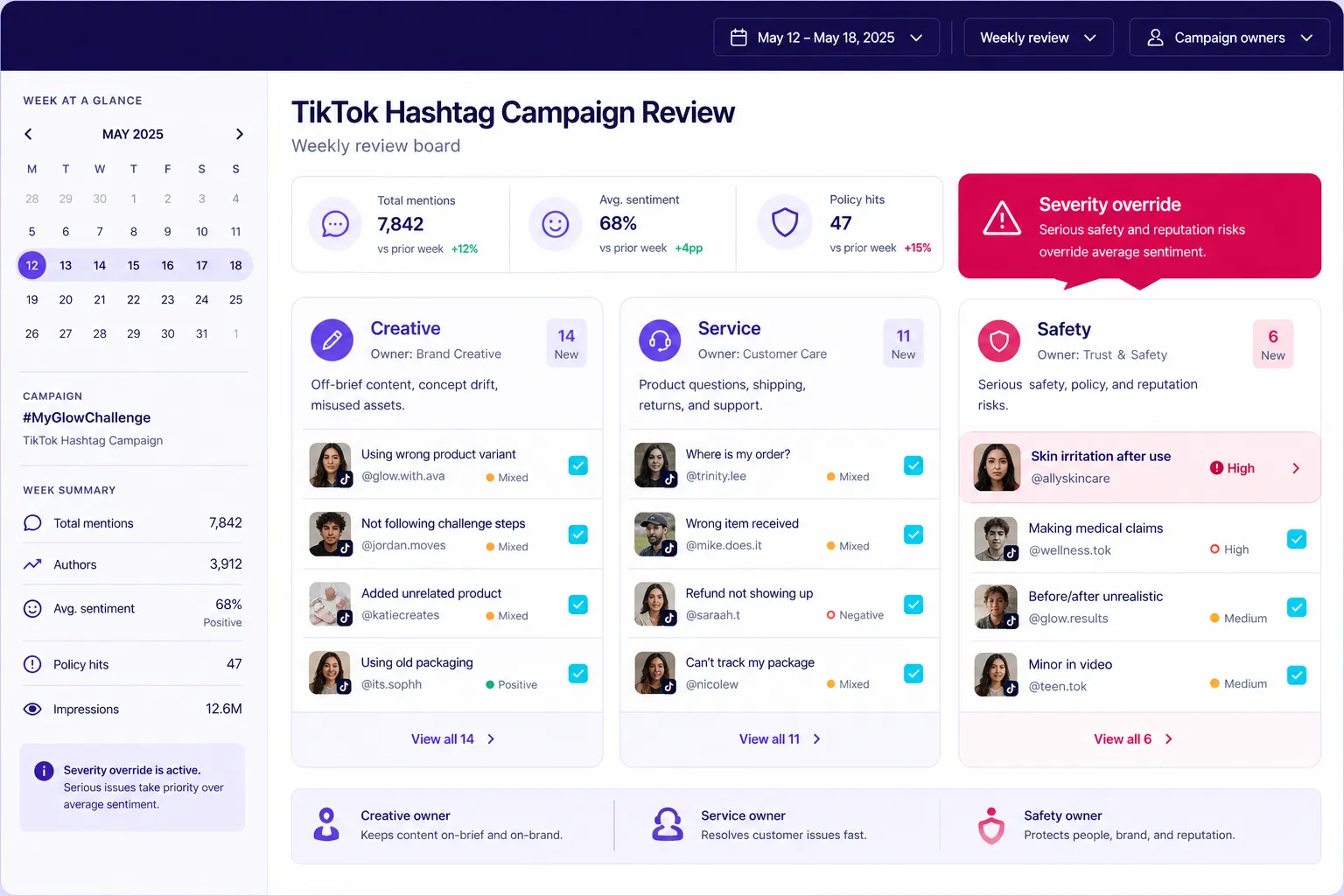
Output: a weekly decision log with named owners, two sentiment figures with their sample sizes and selection rules, and reason-coded risk queues governed by a severity override.
Start the cadence with compliance, because disclosure failures are both a legal exposure and a monitoring field. The FTC's endorsement guidance requires clear disclosure of material connections, which includes payments, gifts, affiliate arrangements and participation incentives. Keep paid, gifted, affiliate, independent and unknown relationships distinguishable in the tracker, because reducing every third-party post to "earned media" misstates both your reach and your compliance position.
What does the review cadence look like?
| Cadence | What you review | Owner and output |
|---|---|---|
| Pre-launch | Baseline, access, query tests, sound register, functional participation test, disclosure terms | Campaign lead signs off the measurement brief |
| Launch day | Expected creator posts, broken identifiers, alert delivery | Analyst closes collection gaps same day |
| Daily (10 minutes) | New participation, sound variants, comment themes, off-platform mentions, alerts | Community or PR owner assigns actions |
| Weekly (45 minutes) | Matched-age performance, creator mix, sentiment themes, coverage gaps | Team records decisions with owners |
| Campaign close | Eligibility cleanup, deduplication, final snapshots | Analyst freezes the reporting dataset |
| Agreed follow-up | Late participation, delayed outcomes, open risks | Campaign lead issues an addendum |
Time-box the weekly meeting so it produces decisions rather than admiration. Ten minutes on participation, ten on performance at matched ages, ten on sentiment and conversation, ten on brand safety, five on what changes next week. Treat that split as an operating default and adjust to your volume, not as a validated staffing standard.
The five questions the weekly review must answer: Did participation broaden beyond contracted creators? Which executions won at comparable post ages? Did sound-only participation expose a briefing gap? What question or complaint repeated? And what do we continue, correct or stop?
Sample properly, or your sentiment number is decoration
For high-volume campaigns, manually reviewing every video and comment is rarely practical, which makes sampling design important. Sorting by top views over-represents parody, because parody travels, which pulls your sentiment read negative. Sorting by recency under-represents the high-visibility content that actually carries reputational risk.
Before you sample anything, make sure the queue is being filled fast enough to sample from: the documented default in a new listening project is daily checking, so switch on Real-Time Monitoring when you create the project and confirm the alert reaches a named owner. The same applies to the keyword set behind it - the practices in our guide to tracking TikTok mentions are what keep the weekly sample drawn from a complete pool rather than a partial one.
So run two deliberately different samples with different jobs, and say so in the report.
- Participation sample (recency-stratified): draw a fixed number of posts per publication-date bucket, spread across creator relationship, market and language. This tells you what is being made now.
- Risk sample (performance-stratified): draw from the top performance decile. This tells you what most people are actually seeing.
- Comment sampling: per sampled video, review a fixed count by recency plus a fixed count by likes, and record both numbers.
- Report two sentiment figures: video-weighted (one vote per post) and comment-weighted (one vote per comment). They frequently disagree, and the gap is itself a finding.
Always publish the sample size and the selection rule. A sentiment percentage without its denominator and method is not a metric.
For TikTok sentiment analysis, identify the target of the opinion before you label it, since a comment can praise the creator while criticising the product. Watch the video alongside the caption, and keep "mixed" and "unclear" as live categories rather than forcing every item into positive or negative. Automate the collection. Do not automate the interpretation.
Separate off-brief content from harmful content
Three queues, three different owners:
- Creative deviation: wrong sound, missing hashtag, misunderstood prompt. Fix through the brief.
- Service issue: availability, delivery, refunds, repeated product questions. Route to customer care.
- Reputation or safety risk: credible harm allegations, dangerous imitation, discriminatory content, privacy exposure, significant disclosure failures. Route to PR, legal or safety.
Use fixed reason codes so patterns become visible across weeks: PARODY, HIJACK, COMPLAINT, COMPETITOR, UNSAFE, MISATTRIB. Rising PARODY is a creative conversation. Rising COMPLAINT is a customer service problem wearing a hashtag.
The severity override: one credible safety allegation outranks a favourable average.
This is the reason I do not publish a universal negative-sentiment threshold, and why you should be sceptical of guides that do. Escalation rules like "30% negative" or "a 20% spike" have no published validation behind them, and they fail in both directions: they fire on small samples and they stay silent when a single serious allegation appears inside a cheerful campaign. Set volume thresholds against your own baseline and your available staffing, then add a severity rule that bypasses them entirely.
Three qualitative signals that matter more than any percentage
- Topic crossover: criticism of your campaign starts appearing in comments under unrelated videos, which means the conversation has escaped its container.
- Platform jump: the conversation reaches Reddit, X or a journalist, which changes the category of problem you are managing.
- Creator distance: contracted creators quietly remove the campaign tag or delete deliverables, an early tell worth investigating on its own merits, before aggregate sentiment moves.
Inauthentic amplification deserves a check in the same pass. Cyabra's August 14, 2025 analysis of the American Eagle backlash reported a 4,000% increase in negative comments across the conversation it examined and classified 15% of the commenting TikTok profiles as fake. Those are that vendor's findings on one campaign, not a platform-wide rate, and they are still a good reason to look at comment repetition, account age and posting patterns before you treat a spike as genuine consumer sentiment.
When any severity flag fires, the sequence is fixed: preserve URLs, evidence and timestamps; alert the named owner; decide whether paid amplification pauses pending review; separate new allegations from repeated copies; record the approved response and the next review time. Then feed the outcome back into your crisis management plan rather than leaving it in a Slack thread.
The hashtag page will never warn you. The first sign of a campaign turning is a comment pattern or a forum thread, so put your alerts where the conversation happens, not where the participation is counted.
Step 5: Build a Report That Separates Activity From Impact
Output: an AMEC-sequenced report in which every headline number traces to a post, a date, a definition and a decision - plus three decisions for next time.
Organise the report around the AMEC Integrated Evaluation Framework, which sequences objectives, outputs, audience response, outcomes and impact. That sequence does two things for you: it forces the objective back to the top of the deck, and it stops platform counters from masquerading as business results.
AMEC's data quality guidance also argues for contextual classification, continuing validation, and human authority over consequential decisions. Practically: use automated sentiment labels to prioritise what a person reviews, never to authorise a crisis response.
What goes in the report, in what order?
- Objective and targets, quoted from the brief. Participation target, quality floor, conversation target.
- Coverage and method, stated before the numbers, not buried in an appendix. Sources, collection routes, query versions and changes, known gaps, unavailable metrics.
- Participation. Qualifying tagged posts, extended participation, unique creators, the owned / paid / gifted / affiliate / independent / unknown split, earned UGC share, remix share, sound adherence and missing-tag participation.
- Performance. Observed views at cutoff with the capture date, matched-age creative comparisons, interaction counts, save rate with its coverage rate, amplified posts reported separately.
- Conversation and earned coverage. Sentiment distribution with reviewed sample size and selection rule, repeated questions and themes, cross-platform coverage by channel, coverage clusters.
- Outcomes. Attributed visits and conversions, commercial results, incrementality evidence if you have it, cost per stated outcome.
- Risks and decisions. Every flag that fired, the decision taken, the outcome, unresolved items, reuse-ready content and permission status.
- Three decisions for next time. No more than three.
Feature top-performing creator content as embedded links with handles rather than screenshots stripped of attribution. Reviewing strong UGC examples from previous campaigns helps you decide which formats deserve that slot, and creators notice which brands credit them.
Cross-platform earned exposure without inflating reach
Give TikTok, other social platforms, news, blogs and forums separate rows. Per channel, report verified content count, available content-level views or impressions, measured reach only where the source provides it, sentiment or message themes, referral traffic, and the measurement source with its limitations.
Then stop. MRC's cross-media standards require deduplication across the reporting period for unique-audience measures, so adding TikTok views to creator follower counts to publisher monthly traffic cannot produce campaign reach. If a vendor hands you a modelled figure, label it "modelled potential audience," explain the method, and keep it in its own row.
Coverage clusters are how you show amplification honestly: original creator post, forum discussion, trade article, follow-up video, linked as a chain. The reader sees the story move without you inventing an audience total.
Connect to business outcomes
Follow Google Analytics campaign parameter guidance for every link you control, keeping source, medium and campaign naming consistent and using the content parameter to distinguish creators or executions. Agree the conversion event and attribution window before launch, then test the full journey from link placement to recorded event.
Report attributed traffic and conversions as attributed. Reserve incrementality claims for a design that can support them. Where you cannot establish causality, describe what the campaign coincided with rather than what it caused, and you will be the most trusted voice in the room.
If stakeholders also care about AI visibility, keep a bounded observation log: the answer engine, the prompt, the date, how the brand was referenced, and which page was cited. That log belongs beside the campaign report, not inside its reach figures. An AI answer is not TikTok exposure, and appearing in one does not prove your campaign caused it.
The broader fundamentals of hashtag monitoring basics carry across platforms. TikTok's sound object and the missing view total are what make the combination above specific to this one.
TikTok Hashtag Campaign Monitoring Checklist
A reliable TikTok hashtag campaign measurement setup is easier to maintain when the essentials are documented before launch. Use this checklist to make sure your tracking covers participation, performance, paid amplification, brand conversation and reporting limitations from the start.
- Define the campaign hashtag.
- Record the pre-launch hashtag post count.
- Save the campaign sound URL and ID.
- Define what qualifies as participation.
- Record contracted creators.
- Track hashtag and sound participation separately.
- Capture per-video metrics at fixed intervals.
- Flag paid amplification.
- Monitor brand mentions and comments.
- Deduplicate by post ID.
- Record query changes.
- Separate views from reach.
- Track conversions independently.
- Document collection limitations.
Toolkit: The Campaign Evidence Ledger (Field-by-Field Tracking Schema)
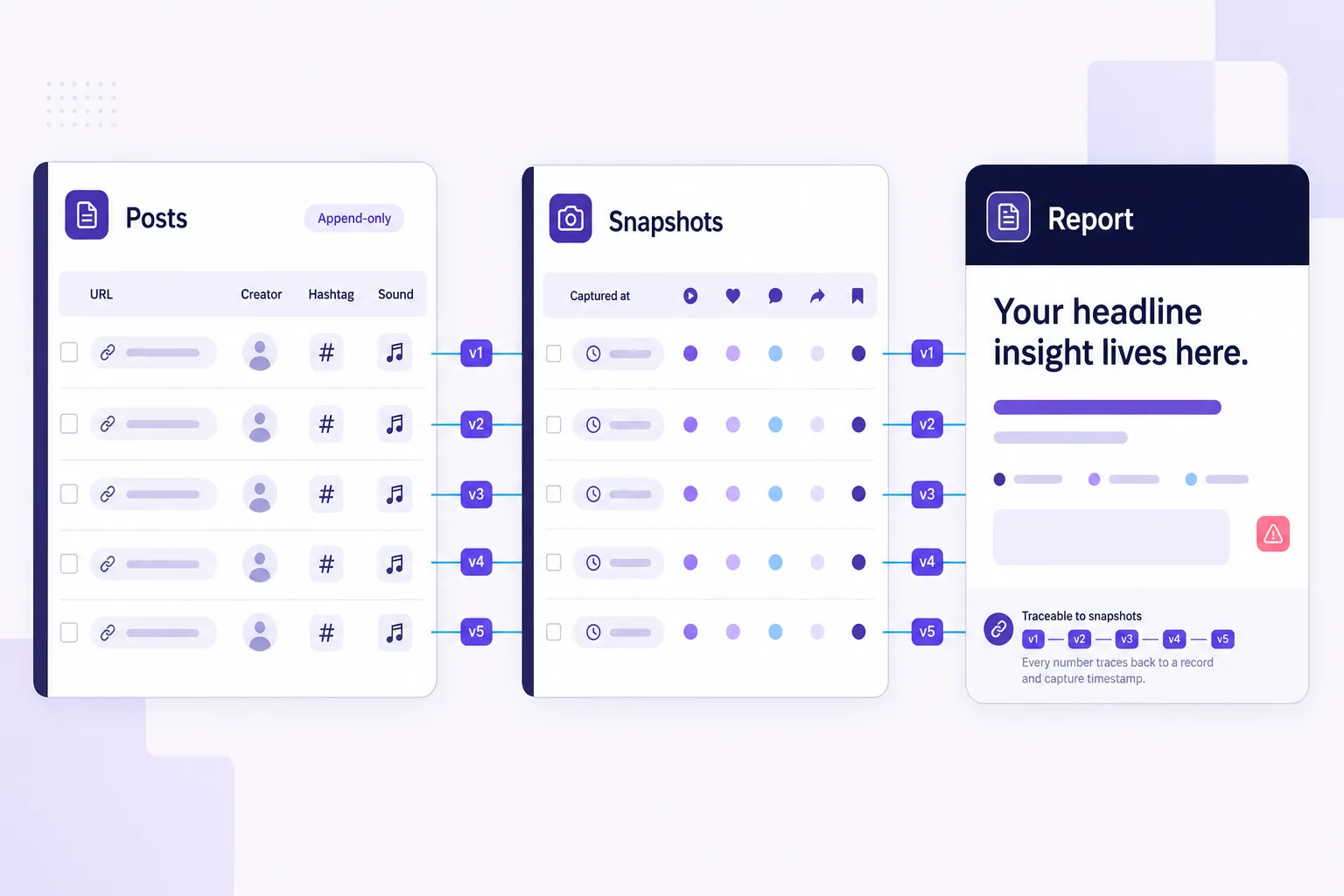
Reference section - build this in Step 2 and feed it through Steps 3, 4 and 5.
This is the asset most competing guides skip, and the one that makes every number in your final report traceable. Build it in a spreadsheet, Airtable or your monitoring tool. Two sheets, one rule: you add rows, you never overwrite an observation.
The two field tables below are collapsed so you can scan past them and open them when you are actually building the tracker.
Sheet 1: Posts (one row per unique record) - open the full field list
| Field | What to record |
|---|---|
| Campaign ID | Stable internal campaign name |
| Record ID | Platform plus post, comment or article identifier |
| Canonical URL | Direct content URL |
| Record type | Video, photo post, comment, article, forum thread |
| Creator ID and handle | Stable ID where available, plus current handle |
| Creator relationship | Owned, paid, gifted, affiliate, independent, unknown |
| Paid amplification | Yes / no / unknown, plus ad reference |
| Published at | Original timestamp and time zone |
| Discovered at | First appearance in your collection |
| Discovery route | Hashtag, brand text, sound review, creator roster, manual |
| Query version | The search configuration that found it |
| Hashtags observed | Caption hashtags as written |
| Sound reference | URL, ID, title, approved variant flag |
| Campaign membership | Tagged, extended, conversation, excluded |
| Eligibility reason | The evidence behind inclusion or exclusion |
| Content format | Original, Duet, Stitch, remake, other |
| Parent or related post | The original behind a remix or discussion |
| Language and market | Known values only; never inferred from appearance |
| Sentiment target | Brand, product, campaign, creator, other |
| Sentiment label | Positive, neutral, negative, mixed, unclear |
| Risk flag and reason code | Safety, disclosure, rights, misinformation, service |
| Rights status | Permission scope, evidence location, expiry |
| Coverage cluster | Related TikTok posts and off-platform coverage |
| Response owner | Named person, action, deadline, status |
| Availability status | Live, inaccessible, deleted, not rechecked |
| Source status | Complete, partial, unavailable, login required |
Sheet 2: Snapshots (append-only, one row per observation) - open the full field list
| Field | What to record |
|---|---|
| Record ID | Join key to Sheet 1 |
| Captured at | Measurement timestamp |
| Post age at capture | Time since publication |
| Views | Observed count or "unavailable" |
| Likes, comments, shares | Separate numeric columns |
| Saves | Count or "unavailable" |
| Authorised analytics fields | Watch time, completion, traffic source where available |
| Data source | Native, public display, creator report, provider |
| Measurement scope | Lifetime, period, paid, organic, combined, unknown |
Two design choices carry most of the value. "Unavailable" is never zero, because a blank you later interpret as zero destroys the metric coverage rate you need to report. And append-only snapshots make matched-age comparisons possible, which is the only way to compare a week-one video against a week-four video honestly.
Then build dashboard panels for participation, performance, conversation quality, risk, outcomes and data health, with filters for campaign membership and creator relationship. A dashboard that cannot separate paid creator posts from independent participation cannot answer the one question the campaign was built to test.
Which signal matters in each campaign phase?
Most dashboards show everything, which means they show nothing. Move one metric to the top-left position each week and let the rest sit a scroll down. The phase bands below are an operating choice, not an algorithmic timetable.
| Phase | Watch daily | Watch every few days | Note but do not react to |
|---|---|---|---|
| Pre-launch | Baseline mention volume and sentiment | Existing tag post count | Follower fluctuations |
| Ignition (first days) | Post count velocity and on-brief rate among seeded creators | Sound adherence | Early per-video views at unequal ages |
| Distribution | Comment themes and sentiment target | Sound-only participation share | Absolute view totals |
| Momentum | Earned UGC share | Save rate on top posts | Like counts |
| Sustainment | Repeat creator rate | Cross-platform spillover | Follower growth (lagging) |
| Tail | New post arrivals | Sentiment on residual posts | Views on week-one posts, already plateaued |
| Close | Unique creators vs seeded creators | Sentiment versus baseline | Single-video outliers, reported separately |
Troubleshooting: Mid-Flight Recovery When You Launched Without a Baseline
Reference section - use this before running Steps 1 to 5 in order if the campaign is already live.
Every guide assumes you started clean. Plenty of readers are on day nine of a campaign that launched without any of this, and abandoning measurement is the wrong response. Here is the recovery sequence.
- Set today's cutoff and call it what it is. Your first defensible observation date is today, not launch day. Write it into the report header.
- Reconstruct the creator roster from contracts and invoices, not from memory. This is the one dataset you can fully recover, and it gives you the paid-versus-independent split that carries most of the analytical weight.
- Backfill what is still visible. Capture the hashtag page post count, the sound page count, and per-video metrics on discoverable posts now, flagging every row as a backfill with today's capture date.
- Reconstruct a proxy baseline from history you can still access. Your own account's 30 days before launch are usually still in native analytics. Use that as the comparison, and state that it covers owned content only.
- Write the irrecoverable list explicitly. Pre-launch sentiment baseline, day-one to day-N velocity, early-deleted content, and any competitor share of voice you did not start capturing. Name them in the method section.
That fifth step is what buys back credibility. A report that says "we cannot establish pre-launch sentiment, so we are reporting campaign-window sentiment only" is trusted. A report that quietly invents the comparison is not.
Worked Example: Seven Records From Discovery to Report
Reference section - the five steps applied end to end on a compressed campaign.
Frameworks are easy to nod at and hard to apply. Here is a compressed campaign, #DeskResetChallenge with the sound "Desk Reset (Original)", taken end to end.
The raw discoveries. Your own launch video with hashtag and sound. A paid creator post with hashtag and sound, later promoted through Spark Ads. A Stitch by that same creator, no hashtag. An independent creator using only the sound, clearly doing a desk reset. A second independent creator using the sound over unrelated gym footage. A Reddit thread arguing about the campaign. A trade article covering it. Plus one comment on the fourth video alleging a desk shelf collapsed.
Deduplicate. The paid creator post surfaced through both the hashtag query and the sound review. That is one record with two discovery routes, not two posts.
Apply the participation rule. Tagged participation: 2 (owned, paid creator). Extended participation: 2 (the Stitch, the verified sound-only desk reset). Excluded: the gym video, since sound use without campaign context is not participation. Conversation: the Reddit thread and the article, logged as records but never as submissions.
Calculate. Qualifying campaign posts: 4. Unique participating creators: 3. Earned UGC share: 1 ÷ 4 = 25%, because only the independent sound-only post has no known commercial relationship. Remix share: 1 ÷ 4 = 25%, classified as a native Stitch. Note that the Stitch came from a paid creator, so it counts toward remix but not earned UGC.
Handle the amplification. The paid creator post's public view total now includes Spark-driven views, so it is flagged amplification: yes and pulled out of your organic benchmark. Its totals never get added to the ad platform report.
Escalate. The shelf-collapse comment is a credible safety allegation. It triggers the severity override regardless of the campaign's positive sentiment average: preserve the evidence, alert the safety owner, decide on pausing amplification, log the response.
Report. Participation: four qualifying posts, three creators, 25% earned share. Performance: observed views across four videos, with capture date, amplified post shown separately. Conversation: one coverage cluster linking the sound-only video, the Reddit thread and the trade article. Risk: one safety allegation, response logged. Nothing summed across incompatible sources.
Four posts is a toy example. The logic does not change at four thousand, which is exactly the point.
Frequently Asked Questions
What metrics can you still track for a TikTok hashtag in 2026?
You can still track hashtag page post counts, qualifying campaign posts, unique participating creators, per-video views, likes, comments, shares, saves/favourites, watch time and completion, traffic source, earned UGC share, remix share, share of observed brand mentions and human-reviewed sentiment - with availability depending on your access route (native analytics, public display, creator report or vendor).
Are TikTok hashtag views really gone?
The public in-app aggregate view total came off hashtag pages, a removal the Center for Countering Digital Hate documented on February 7, 2024, and Creative Center stopped supporting lookups of arbitrary hashtags in January 2024. TikTok's advertiser trend surfaces still display "Posts & Views" for the hashtags they choose to surface, so a legitimate hashtag view figure can still appear for trending terms. Your campaign tag will rarely be among them, and neither counter is an audited census of your activation, so build reporting from qualifying posts and their observed performance instead.
Where do you check TikTok hashtag analytics in 2026?
In three places, each answering a different question: TikTok Studio for per-video views, likes, comments, shares, saves, watch time, completion and traffic source on accounts you control; the hashtag page for the surviving public post count, which is cumulative since the tag's first use, so report the delta from a timestamped baseline; and the sound page for the video count tied to your campaign audio. Save the canonical sound URL and sound ID, and classify posts individually rather than dividing one count by another.
Is a TikTok hashtag view count the same as reach?
No. A view count is a tally of exposure events, while reach is a unique-audience measure, and the Media Rating Council's cross-media standards require deduplication across the reporting period before any unique-audience claim. Summing video views - or adding them to creator follower counts and publisher traffic - therefore cannot produce a campaign reach figure. Report "observed views across N qualifying videos, captured on this date," and if a vendor supplies a modelled number, label it "modelled potential audience" with its method and keep it in its own row.
How do you calculate TikTok engagement rate for a hashtag campaign?
Use engagement rate by views = (likes + comments + shares) ÷ video views × 100, and at campaign level divide summed interactions by summed views across the same eligible post set rather than averaging post-level percentages, which weights a 400-view video the same as a 4 million-view video. Calculate save rate = saves ÷ views × 100 only across posts where both fields exist, and if you fold saves into a broader engagement rate, name that version explicitly because a rate including saves is not comparable to one that excludes them. The defensible benchmark is your own account's rate over the 30 days before launch, with earned creator posts compared against a creator cohort rather than your brand account.
How do you handle Spark Ads boosted posts in campaign reporting?
TikTok documents that views and engagement generated by a Spark Ads promotion accrue to the original organic post, so the boosted post's public totals cannot be added to your ad platform totals without double counting, and its growth cannot be presented as organic participation performance. Fix it with a field rather than a footnote: record paid amplification status (yes / no / unknown) plus the ad reference on every post row. Then exclude amplified posts from organic benchmark calculations, or report them as a clearly separate cohort.
Should the campaign hashtag go in the caption or the first comment?
Put it in the caption and specify that in the creator brief. Caption hashtags are what attach a video to the hashtag page and what keyword-based listening projects search, since TikTok's own documented keyword matching for research queries runs against video descriptions. Track comment-only references separately, and do not assume a hashtag typed in a comment makes the parent video discoverable through hashtag search or your listening tool.
How do you track a campaign sound when creators skip the hashtag?
Save the canonical sound page URL, the displayed title and the sound ID at launch, then review sound-linked videos on the same cadence as the hashtag page and register any variant uploads you find. Confirm campaign relevance by hand, because not every use of your audio is participation. Note the limitation clearly: entering a sound title as a keyword finds text references to the sound, not every video that used the audio, unless your provider can demonstrate sound-ID tracking.
Can you monitor a TikTok hashtag campaign properly with no software budget?
Yes, within a documented limit. Native analytics for your own posts, daily screenshots of the hashtag and sound page counts, manual per-video capture on a stratified sample, and the two-sheet ledger will produce a defensible report. The binding constraint is staff time rather than capability, so set a review cadence you can actually sustain and state your collection limits in the method section rather than presenting a sample as a total.
Conclusion: Monitor the Change, Not the Number
The removal of the hashtag view counter forced a correction that TikTok measurement needed anyway. That single figure hid the three questions that actually matter: did people participate, did they participate the way you hoped, and what did they say about it. Every metric still standing on the platform answers one of those three, provided you compare it to a baseline you set before launch.
The deeper shift is about provenance. What separates a credible 2026 campaign report from a decorative one is not the size of the tool stack, it is whether a stakeholder can click from any headline number to the post, the date, the definition and the decision behind it. Platform fields will keep changing, as TikTok's own 2026 changelog entries show, and the teams that survive those changes are the ones whose numbers were never dependent on a single counter in the first place.
So do the unglamorous part first. Before the next creator publishes, approve the participation rule, register the sound and test it from an ordinary account, screenshot the baselines with timestamps, lock your query version, and put a named owner next to the alert queue. Then run one campaign through the ledger, delete the fields that did not earn their place, and you will have something better than a dashboard: a repeatable system that tells you what to do on Monday.
Filed under: Digital Marketing